

synth-forge: Generate High-Quality Synthetic SFT Datasets from a Topic Seed

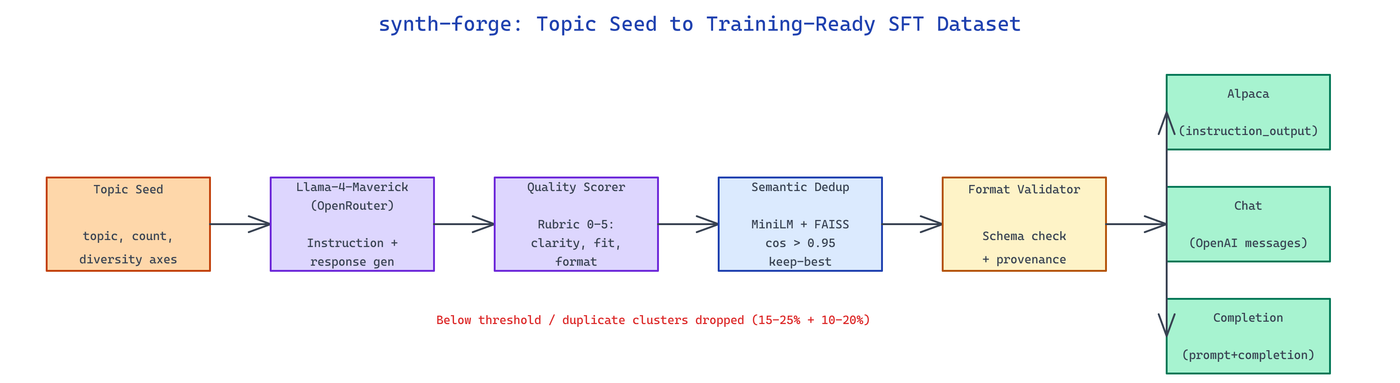 Pipeline Architecture
The Problem
Building a solid fine-tuning dataset still means either paying labelers or writing brittle one-off generation scripts that produce repetitive, low-diversity examples nobody catches until after training.
NEO built synth-forge to turn a topic seed into thousands of scored, deduplicated instruction-response pairs ready to drop into an SFT pipeline.
Topic-Seeded Generation with Llama-4-Maverick
synth-forge takes a topic seed, a target row count, and a diversity directive, then drives Llama-4-Maverick via OpenRouter through a structured generation loop. Each batch request asks for N candidate instructions with deliberate variation along three axes: task type (classification, extraction, reasoning, rewriting), difficulty (beginner to expert), and persona (the user role framing the instruction). This keeps the generator from collapsing into a narrow distribution of lookalike prompts.
synth-forge generate \
  --topic "customer support for e-commerce" \
  --count 5000 \
  --model meta-llama/llama-4-maverick \
  --temperature 0.9
Responses are generated in a second pass so the grader can judge instruction-response fit against the same criteria a reviewer would.
Quality Scoring and Semantic Deduplication
Every candidate row goes through a rubric-based quality scorer — clarity, specificity, answer correctness, and format fidelity — each graded 0-5 by a judge model call. Rows below a configurable threshold are dropped. The scorer emits per-row rationale for audit trails.
Semantic deduplication runs after scoring: prompts are encoded with all-MiniLM-L6-v2, indexed with FAISS, and pairs with cosine similarity above 0.95 are clustered. Only the highest-scoring row from each cluster survives. This catches the silent duplication that temperature sampling produces after a few thousand generations.
| Stage | Purpose | Typical Drop Rate |
|---|---|---|
| Generation | Produce candidate pairs | — |
| Quality scoring | Rubric-based filter | 15-25% |
| Semantic dedup | Cluster + keep-best | 10-20% |
| Format validation | Schema check | 1-3% |
Multi-Format Export
The final dataset exports to three conventions so downstream training code doesn't have to reshape anything: instruction_output (Alpaca-style), chat (OpenAI messages), and completion (prompt+completion string). Provenance metadata — seed, model, temperature, quality score, dedup cluster ID — rides alongside every row.
synth-forge export \
  --input generated/raw.jsonl \
  --format chat,instruction_output \
  --min-quality 3.5 \
  --output datasets/
Runs producing 10k rows typically land in 30-50 minutes depending on provider latency; the output is already filtered, deduplicated, and ready to stream into a training job.
How to Build This with NEO
Open NEO in VS Code or Cursor and describe what you want to build. A good starting prompt for this project:
"Build a CLI that generates synthetic instruction-tuning datasets from a topic seed using Llama-4-Maverick via OpenRouter, varies generation along task-type/difficulty/persona axes, scores each candidate with a rubric-based judge, deduplicates semantically with MiniLM embeddings and FAISS at 0.95 similarity, and exports to Alpaca, chat, and completion formats with per-row provenance metadata."
NEO generates the project structure and core implementation. From there you iterate — add domain-specific rubrics, wire the scorer to a fine-tuned judge model for higher fidelity, or build a preview UI that samples 50 rows for human review before committing. Each request builds on what's already there.
To run the finished project:
git clone https://github.com/dakshjain-1616/synth-forge
cd synth-forge
pip install -r requirements.txt
synth-forge generate --topic "legal contract review" --count 2000
Output lands in ./generated/ with both the raw candidates and the filtered, deduplicated, format-converted final dataset.
NEO built a synthetic data pipeline that turns one topic sentence into a training-ready SFT dataset with built-in quality gates. See what else NEO ships at heyneo.com.
Try NEO in Your IDE
Install the NEO extension to bring AI-powered development directly into your workflow:
- VS Code: NEO in VS Code
- Cursor: Install NEO for Cursor