
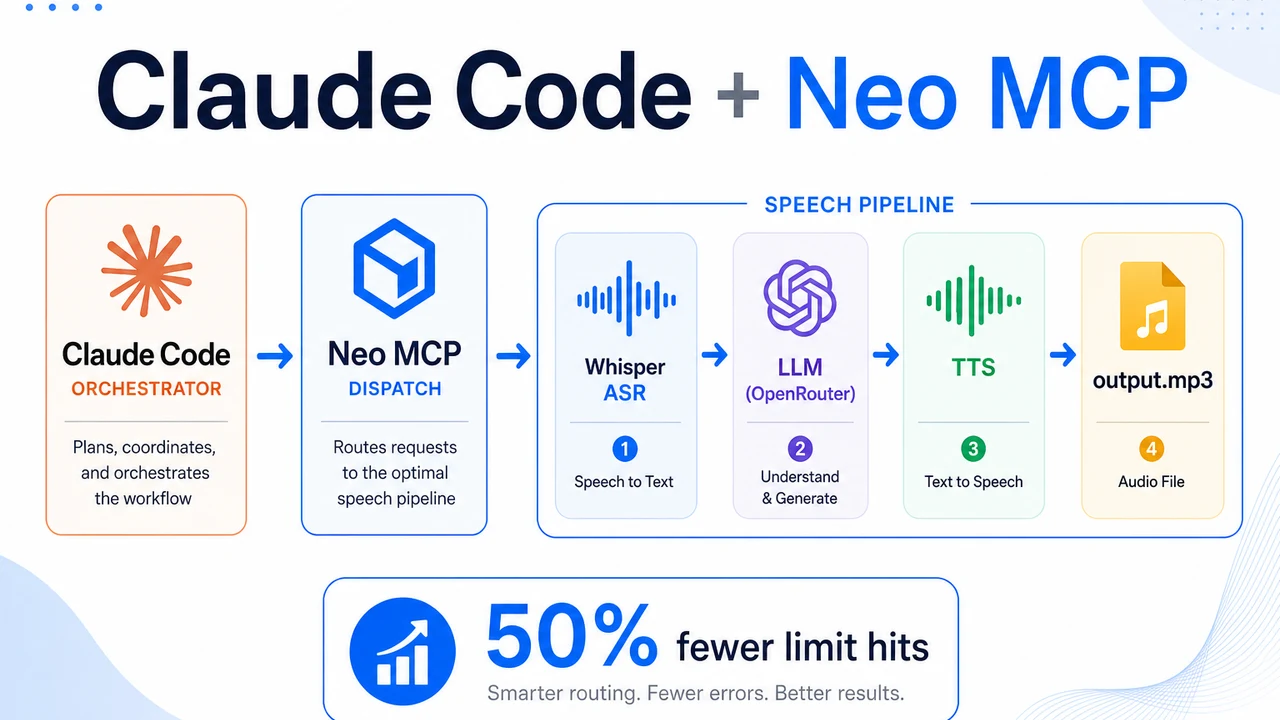
Cut Your Claude Code Limit Hits in Half: Pair It with Neo over MCP

A real case study: a CPU-only speech-to-speech pipeline where Claude Code orchestrated and Neo did the token-heavy research, build, and debugging over MCP, same output, over 50% fewer limit hits.
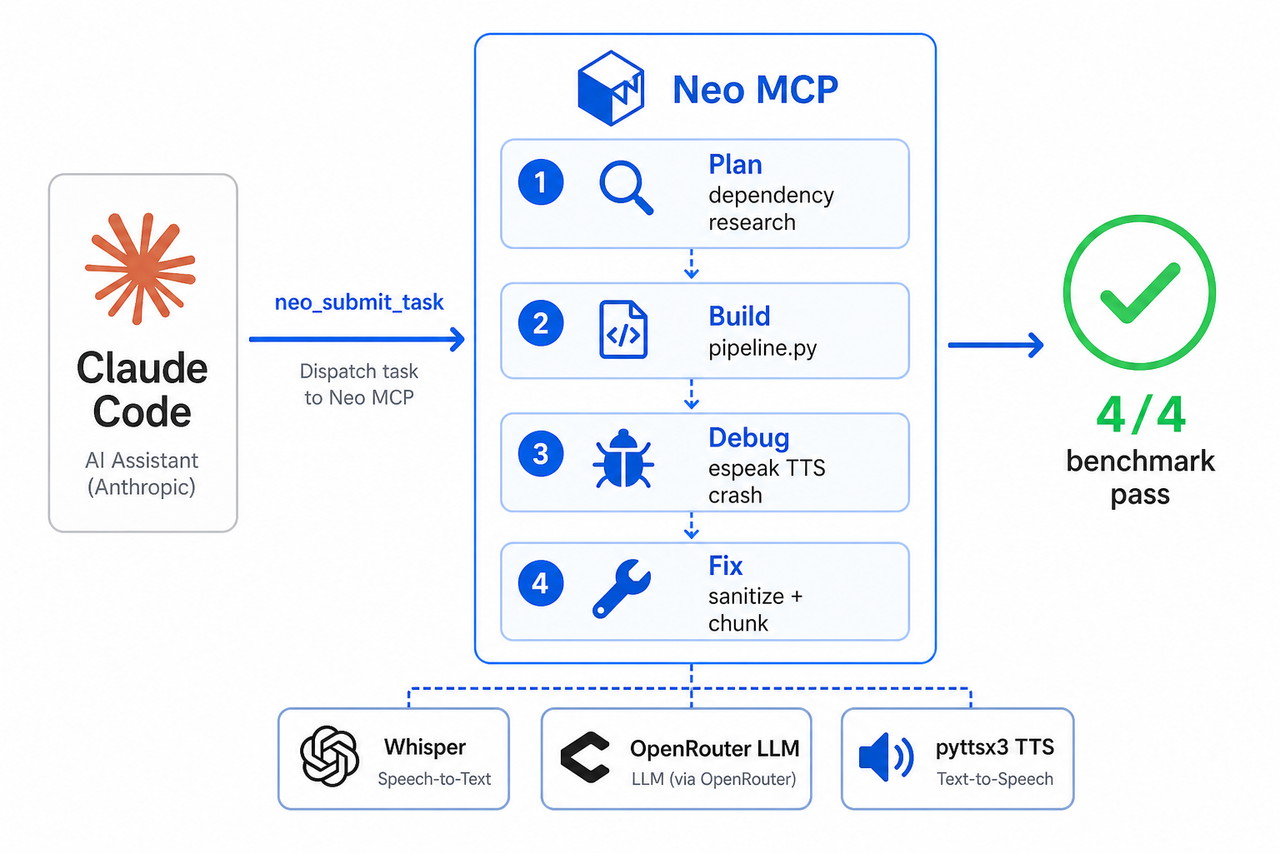 The Neo + Claude Code loop
If you use Claude Code daily, you know the feeling: you're mid-flow and you hit the usage limit. And it almost always happens while Claude Code is deep in the unglamorous part of the job, reading docs to find the right dependency, writing boilerplate, or grinding through a runtime bug that only shows up on input #3.
Here's the reframe that fixes it: Claude Code's limits aren't a model problem, they're a division-of-labor problem. The tokens disappear because one agent is doing both the thinking you care about and the grunt work you don't. Make the same agent research a stack, write the implementation, and iterate through a debug loop, and of course you run out of headroom.
So change the division of labor. Add Neo to Claude Code over MCP and Claude Code stops doing the grunt work, it becomes an orchestrator that dispatches tasks, reviews diffs, and stays in control, while Neo does the heavy research and implementation on its own compute. Same output, over 50% fewer limit hits, and you never leave Claude Code. The rest of this post is the proof.
Where your limits actually go
When you delegate over MCP, the token-heavy work runs on Neo's compute, not in your Claude Code session. That asymmetry is the entire pitch:
| Claude Code (your limits) | Neo (its own compute) | |
|---|---|---|
| Turns spent | a handful | dozens of iterations, plus repeated full benchmark runs |
| What those turns were | write the task, read the plan, read the diff, accept | research the dependencies, write the whole pipeline, debug the crash across many iterations, re-run the benchmark until all four inputs pass |
In a solo session, every one of the items in that right-hand column, each doc read, each code re-run, each iteration, burns your context window and counts against your limits. Move them onto Neo and Claude Code spends its tokens deciding and reviewing, not grinding. For this project, that was the difference between bumping into our limits constantly and barely noticing them: over 50% fewer limit hits, same result.
And the shape repeats. A new integration, a flaky test, an unfamiliar library, a dependency that refuses to resolve, every task with a heavy research or debugging phase looks like this one. So the savings don't show up once and disappear; they compound across a workday. The limit you slam into at 3 p.m. is usually the sum of a dozen small, grindy detours, and those detours are exactly what Neo absorbs on its own compute.
The proof: a real project, bug included
The project is a CPU-only speech-to-speech pipeline, audio in, spoken answer out (Whisper → an LLM on
OpenRouter → text-to-speech → output.mp3). I barely wrote a line of it by hand. The mechanic is
simple: Claude Code dispatches a self-contained unit of work to Neo with a single MCP call
(neo_submit_task) and gets back a plan, a diff, and a result to review; Neo runs locally and writes
files straight into the workspace, so there's no "copy this into your project" step. Neo planned the
project, resolved the dependencies, wrote the code, and (when we hit a genuinely nasty bug) chased it
to the root. Here's how it went.
Plan first: the dependency maze, handled before any code
Before writing a line, Neo wrote a short plan (docs/neo-plan.md). The useful part
wasn't the prose, it was that the environment questions were answered up front, with reasoning:
- Whisper: openai-whisper package, "base" model chosen for CPU (accuracy/speed balance, no GPU).
- pyttsx3: needs espeak-ng and libespeak-ng1 system packages. save_to_file() writes a WAV.
  Use pydub to convert WAV → MP3 (requires ffmpeg).
- ffmpeg: needed by pydub for MP3 encoding, also by Whisper for audio loading.
- No GPU: all inference on CPU.
The correct system package is espeak-ng, not the more obvious espeak. The WAV→MP3 hop goes through
pydub rather than hand-rolled subprocess ffmpeg calls. Whisper's base model is the right size for
CPU. Those are exactly the things you'd otherwise discover by trying the wrong one first and backing
out. Here they were decided before the build started, and written down where I could check them.
The build: one readable file, three clear stages
What came back was a single pipeline.py: small, linear, three labeled stages ,
transcribe() (Whisper), get_llm_response() (OpenRouter via the OpenAI SDK), text_to_speech()
(pyttsx3 → pydub). It's the kind of code you can read top to bottom in two minutes and hand to someone
learning the stack. For a pipeline whose whole job is "audio in, audio out," that readability is a
feature, not a shortcut.
And on a friendly greeting, it worked on the first try.
The bug: the speech engine keeps crashing
Then I ran it across four realistic inputs, a normal question, a greeting, a faster question, and a
long multi-clause utterance, with a tiny benchmark harness (benchmark.py). Three of
the four failed, all in the same place:
[ERROR] TTS stage failed: pyttsx3 failed to produce the WAV file.
Exception ignored on calling ctypes callback function:
<bound method EspeakDriver._onSynth ...>
  File ".../pyttsx3/drivers/espeak.py", line 197, in _onSynth
The one input that passed (the greeting) got a short, plain reply; the three that failed got longer,
formatted ones. So: 1 of 4 (benchmark_results_prefix.json). The
obvious suspect was markdown, the LLM (mistralai/ministral-8b-2512) likes to answer with
**bold** and bulleted lists, and those characters do upset espeak-ng. Hold that thought; the obvious
suspect turned out to be only half the story.
This is the classic "works on the happy path" bug, invisible in a quick demo, fatal in practice. Exactly the kind of thing you don't want to spend your afternoon hand-debugging.
The fix I would have shipped was wrong: Neo's wasn't
So I didn't hand-debug it. I described the symptom to Neo in one message, the TTS stage crashes on most replies, fix it so every input speaks, and let it work.
This is where a shallow agent and a thorough one part ways. Neo started exactly where I would have: a
markdown sanitizer, a small standard-library helper that strips **bold**, lists, backticks, links,
and the punctuation espeak dislikes. That got the pass rate to 3 of 4, better, and tempting to
call done. A lot of agents would have stopped right there and handed back a patch that looks finished.
Instead of declaring victory, Neo bisected the one reply that still crashed and found the actual root
cause:
espeak-ng, as pyttsx3 drives it, crashes in its
_onSynthcallback when given text longer than ~90–100 characters, producing a 0-byte WAV. The crash is non-deterministic and independent of content; clean plain prose triggers it too. Markdown just made it more likely.
Stripping markdown was treating a symptom. The real bug is an espeak-ng buffer issue on long utterances. So Neo's final patch does two things, sanitize the text, then chunk it (condensed):
def text_to_speech(text):
    clean  = sanitize_for_speech(text)             # strip markdown + bad punctuation
    chunks = _chunk_text(clean, max_chars=80)      # split at sentence boundaries
    segments = []
    for i, chunk in enumerate(chunks):             # synthesize each short chunk
        engine.save_to_file(chunk, f"chunk_{i}.wav")
        engine.runAndWait()
        segments.append(AudioSegment.from_wav(f"chunk_{i}.wav"))
    combined = sum(segments[1:], segments[0])      # concatenate with pydub
    combined.export("output.mp3", format="mp3", bitrate="192k")
Each chunk stays under espeak's danger length; the WAV segments are concatenated with pydub into one
MP3. The real version also skips any chunk that comes back empty and cleans up its temp files in a
finally block, but it left the model ID and three-stage structure untouched. The full code is in
pipeline.py; the diagnosis and diff in docs/neo-bugfix-log.md.
That gap (3/4 versus 4/4) is the whole difference between a plausible patch and a correct one. The shallow fix is what I'd have shipped, and it would have failed 1-in-4 in production. Neo chased the symptom to the actual cause instead. That is the behavior you want from an agent you delegate to, not the first patch that turns the tests green, but the one that still holds when the inputs change.
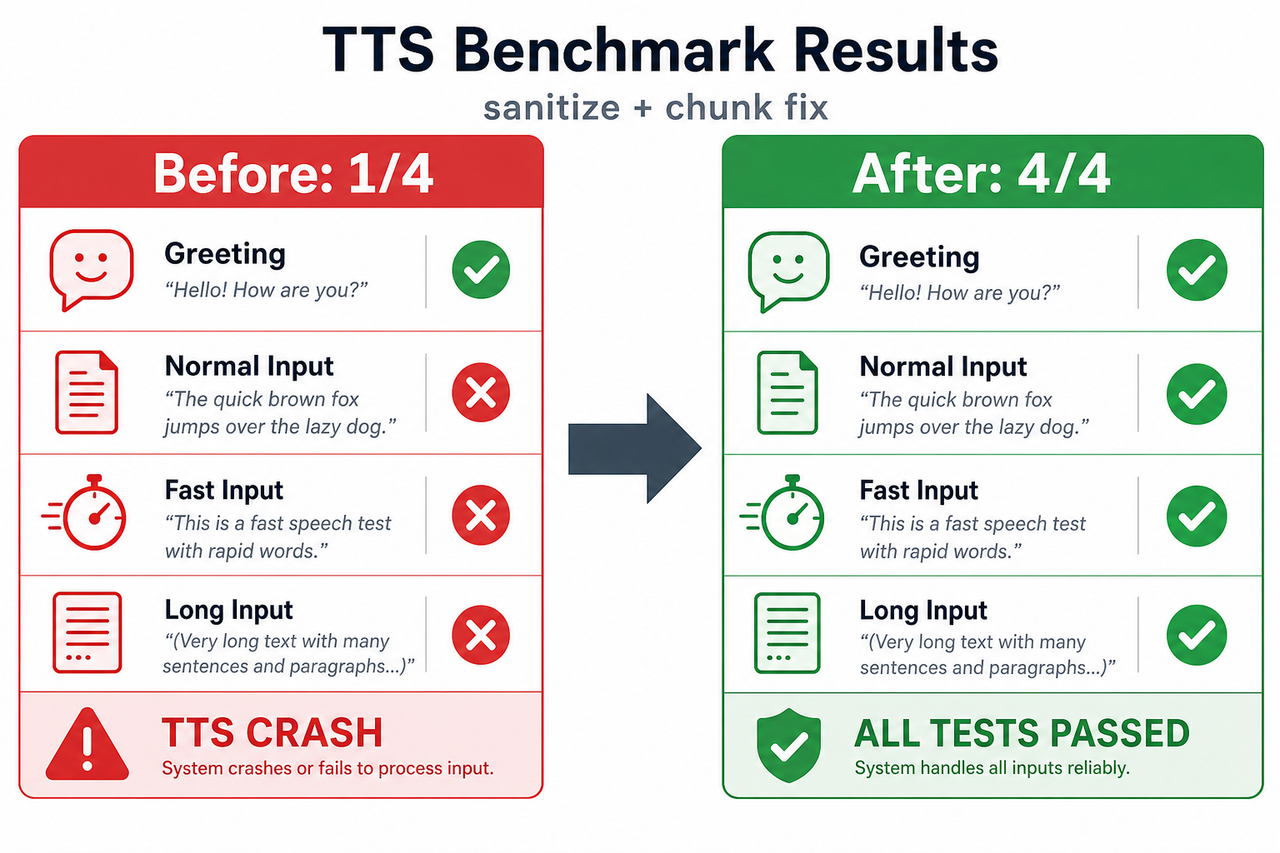 Benchmark results: 1/4 before the fix versus 4/4 after sanitize and chunk
The result: 4 / 4
Here's the long input actually running after the fix, and the reply it drew is exactly the kind
that used to crash:
[ASR] Transcription: "I am planning a trip to Japan next spring..."
[LLM] Response:  "Start with Tokyo (4-5 days) for neon lights... Kyoto (4 days) for temples...
                  Osaka (2-3 days)... Hiroshima (2 days)... Hakone (1-2 days) for Mt. Fuji views."
[TTS] Sanitised input (400→390 chars)
[TTS] Split into 7 chunk(s) for synthesis
[TTS] Synthesising chunk 1/7 (79 chars) ... chunk 7/7 (11 chars)
[TTS] Output saved to output.mp3 (468159 bytes).
[✓] Pipeline completed in 5.8 seconds → output.mp3
Those parentheticals ((4-5 days), (2-3 days)) are precisely what tipped espeak over the edge
before. Now the reply gets sanitized, split into seven sub-80-character chunks, synthesized one piece
at a time, and stitched back into a single valid 23-second MP3. Across all four inputs:
| Input | Before (markdown/length crash) | After (sanitize + chunk) |
|---|---|---|
| greeting | ✓ exit 0, ~7.4s | ✓ exit 0, ~7.5s |
| normal | ✗ TTS crash | ✓ exit 0, ~8.2s |
| fast | ✗ TTS crash | ✓ exit 0, ~7.6s |
| long | ✗ TTS crash | ✓ exit 0, ~8.5s |
| Total | 1 / 4 | 4 / 4 |
I re-ran the benchmark twice to be sure it wasn't luck, the model returns different wording each time
(it's sampled at temperature 0.7), and both runs passed 4/4. That's the tell that the fix addresses the
cause, not one unlucky phrasing. Timings are representative, not precise: Whisper on CPU dominates and
its load time depends on OS file caching (cold vs. warm), so a total can swing a couple of seconds run
to run, the standalone run above was 5.8s on a warm cache; the table is a colder benchmark pass. The
1/4 → 4/4 result is the stable part. Reproduce it yourself: python tools/make_fixtures.py && python benchmark.py, with the numbers in
benchmark_results_prefix.json and
benchmark_results.json.
The takeaway
Neo didn't replace the engineering judgment. I still decided what to build, read every diff, and accepted the fix. What it removed was the friction around that judgment: the research detours, the boilerplate, the runtime-only bug hunt. In practice the role you play shifts: instead of hand-resolving dependencies and stepping through a debugger, you write a clear task, read the plan Neo sends back, and check the diff against what you actually asked for. That review is where your judgment earns its keep , and it is cheap, in both tokens and attention, while the heavy execution runs on Neo's side, against Neo's credits rather than your Claude Code limits. The pipeline went from an idea to 4/4 passing without me ever leaving Claude Code, and without burning through my limits to get there.
Add Neo MCP to your Claude Code workflow
Neo MCP plugs Neo into Claude Code over the Model Context Protocol. You ask in chat; Claude dispatches the heavy work; Neo plans, runs, and writes artifacts straight into your repo. Three steps to connect it:
1. Install neo-mcp
Python 3.11+:
pip install neo-mcp
2. Get your secret key
Create a Neo API key in the dashboard and copy it. Keys look
like sk-v1-YOUR_KEY. Treat them like passwords and do not commit them to git.
3. Add Neo to Claude Code
Run this in your system terminal (not inside a chat). Replace sk-v1-YOUR_KEY with your real key:
claude mcp add --scope user neo \
  -e NEO_SECRET_KEY=sk-v1-YOUR_KEY \
  -- python3 -m neo_mcp
Confirm with claude mcp list. You should see neo with a green check. Then ask Claude in plain
language, e.g. "Use Neo to build this pipeline and fix the TTS crash", and review what comes back.
Claude calls the MCP tools for you; you stay in the editor and read the diffs.
Full setup for Cursor, VS Code, and other editors, plus troubleshooting: docs.heyneo.com/neo-mcp.
All numbers come from the committed benchmark JSON files and are reproducible with benchmark.py.
The pipeline log is real output; the text_to_speech snippet is condensed for readability, the full
version lives in pipeline.py. Plan and bug-fix quotes are from docs/neo-plan.md and
docs/neo-bugfix-log.md.
On the "over 50%" figure: it reflects the share of this build, the dependency research, the implementation, and the multi-iteration debug loop, that ran inside Neo rather than in the Claude Code session, i.e. the Claude-Code work we avoided by delegating. It is an estimate of that offloaded share, not an instrumented count of limit-hit events across matched builds.
Try NEO in Your IDE
Install the NEO extension to bring AI-powered development directly into your workflow:
- VS Code: NEO in VS Code
- Cursor: Install NEO for Cursor