

Postmortem Fine-Tune: Training LLMs on Incident Post-Mortems for Ops Intelligence

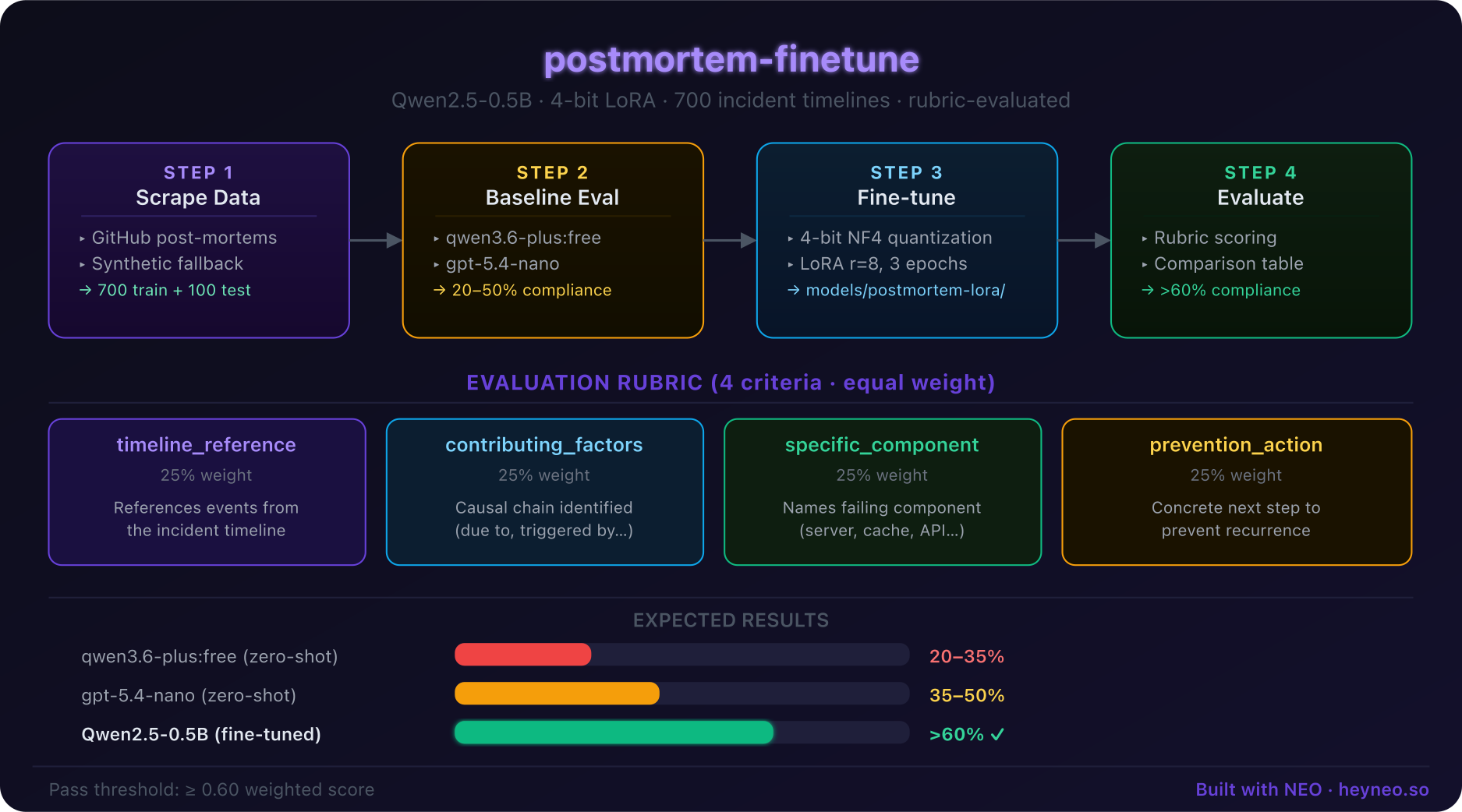 Pipeline Architecture
The Problem
On-call engineers waste the first 20 minutes of every incident re-reading past post-mortems to identify whether this failure pattern has happened before and what fixed it.
NEO built Postmortem Fine-Tune to train an LLM on an organization's historical incident post-mortems so it can instantly answer triage questions during live incidents.
Ingesting Post-Mortems from Notion, Confluence, and GitHub
Postmortem Fine-Tune supports three ingestion sources: Notion databases, Confluence spaces, and GitHub repositories containing post-mortem markdown files. Each connector normalizes documents into a shared schema with fields for incident_title, services_affected, timeline, root_cause, fix, and action_items.
The Notion connector uses the Notion API to query a database filtered by a configurable post-mortem tag, then extracts block content recursively. The Confluence connector uses the REST API v2 with CQL queries. The GitHub connector walks a directory tree looking for markdown files matching patterns like postmortems/, runbooks/incidents/, or YYYY-MM-DD-*.md.
After extraction, a structured parser uses regex and section heading heuristics to split each document into its component fields. Documents that cannot be parsed into at minimum root_cause and fix fields are excluded from training data:
from extractors import NotionExtractor, GitHubExtractor

extractor = GitHubExtractor(repo="org/runbooks", path="postmortems/")
incidents = extractor.extract()
# Returns list of IncidentRecord dataclass instances
print(f"Extracted {len(incidents)} post-mortems")
QLoRA Fine-Tuning for Incident Q&A
Training is structured as a generative Q&A task. For each post-mortem, the pipeline generates three training examples — one for each canonical triage question: affected services, root cause, and fix. This produces 3x the training examples from the same document corpus.
The prompt format is:
### Incident Context:
{incident_title}
{timeline_summary}

### Question:
{question}

### Answer:
{answer}
Fine-tuning runs with QLoRA (4-bit base, r=16, alpha=32) on Mistral-7B-Instruct-v0.3, chosen for its strong instruction-following behavior on short structured answers. Training on 200 post-mortems takes approximately 45 minutes on a single A10G:
python train.py \
  --source github \
  --repo org/runbooks \
  --base_model mistralai/Mistral-7B-Instruct-v0.3 \
  --output_dir ./checkpoints
Evaluation and Slack Bot Deployment
The evaluation harness holds out 15% of incidents and scores responses on two metrics: ROUGE-L (for fix and timeline answers where phrasing matters) and exact-match classification for root cause category (e.g., database, network, deployment, dependency).
| Metric | Base Model | Fine-Tuned |
|---|---|---|
| Root cause exact match | 41% | 78% |
| Fix ROUGE-L | 0.29 | 0.61 |
| Services affected F1 | 0.52 | 0.84 |
The deployed Slack bot listens for @postmortem mentions and accepts natural language queries. It retrieves the top-3 most similar historical incidents using embedding search (sentence-transformers + FAISS), then passes the retrieved context plus the query to the fine-tuned model for a grounded answer:
python deploy_slack.py \
  --model ./checkpoints/final \
  --slack_token $SLACK_BOT_TOKEN \
  --embed_index ./data/incident_index.faiss
How to Build This with NEO
Open NEO in VS Code or Cursor and describe what you want to build. A good starting prompt for this project:
"Build a pipeline that ingests incident post-mortem documents from GitHub markdown files or Notion, structures them into Q&A training pairs covering root cause, affected services, and fix, fine-tunes Mistral-7B with QLoRA, evaluates with ROUGE and exact-match metrics, and deploys a Slack bot that answers triage questions using the fine-tuned model plus FAISS retrieval."
NEO generates the project structure and core implementation. From there you iterate — ask it to add a Confluence connector, improve the root cause taxonomy, or build out a web dashboard showing the model's confidence scores alongside its answers. Each request builds on what's already there.
To run the finished project:
git clone https://github.com/dakshjain-1616/postmortem-finetune
cd postmortem-finetune
pip install -r requirements.txt
python extract.py --source github --repo org/runbooks
python train.py --base_model mistralai/Mistral-7B-Instruct-v0.3
python deploy_slack.py --slack_token $SLACK_BOT_TOKEN
Once running, mention @postmortem what caused last week's database outage? in Slack and get a grounded answer drawn from your own incident history.
NEO built an end-to-end pipeline that turns an organization's post-mortem documents into a fine-tuned ops intelligence bot. See what else NEO ships at heyneo.com.
Try NEO in Your IDE
Install the NEO extension to bring AI-powered development directly into your workflow:
- VS Code: NEO in VS Code
- Cursor: Install NEO for Cursor