
Automating New Hire Onboarding Across Five Enterprise Systems

 Pipeline Architecture
The Problem
Every new hire triggers the same checklist. Create the email account. Add them to Jira. Set up Slack. Schedule the first one-on-ones. Send the welcome email. It's ten to thirty minutes of manual work per person that happens dozens of times a year — and it breaks in predictable ways when someone forgets a step or executes them out of order, leaving new hires without access to critical systems on their first day.
NEO autonomously built a configuration-driven onboarding engine that handles all of it. One JSON file describes your company's setup. One command provisions the new hire across every system.
Five Systems, Five Phases
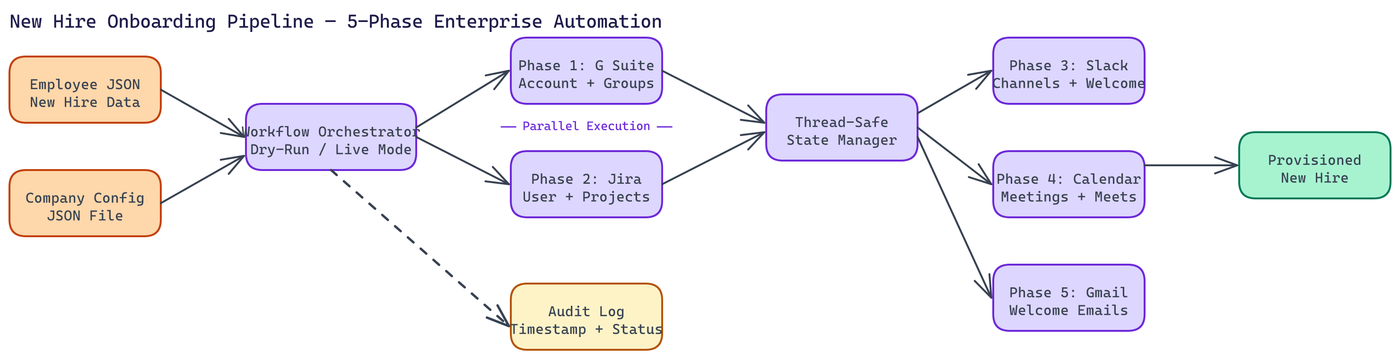
The onboarding workflow runs across five phases, and two of them execute in parallel.
Phase 1: G Suite Identity. Account creation, temporary password generation, and email group assignment. This is the foundational step. Every other system depends on having a valid corporate email.
Phase 2: Jira. User creation, project assignment, and role configuration. This runs in parallel with Phase 1 — while the G Suite account is being provisioned, Jira doesn't need to wait. While the G Suite account is being provisioned, Jira doesn't need to wait. Both phases signal completion to a shared state manager, and downstream phases only proceed when both are done.
Phase 3: Slack. User provisioning, channel assignment based on team and role, and an automated welcome message posted to the relevant channels. The welcome message content is configurable per role.
Phase 4: Google Calendar. Automated scheduling of one-on-one meetings with team leads, with Google Meet links generated and attached. Meeting cadences and attendees are defined in the company config file.
Phase 5: Gmail. Personalized welcome emails sent to both the new corporate address and the personal address provided during setup. Templates are configurable. Sensitive fields like temporary passwords are masked in logs.
The Design Choices That Matter
Configuration-Driven, Not Hardcoded
Nothing company-specific lives in the codebase. Your org structure, team leads, Slack channels, Jira projects, and email templates all live in a JSON config file you generate once. The CLI has a --generate-config command that walks you through the initial setup interactively. After that, the tool reads from the file.
This means the same codebase runs for a ten-person startup and a five-hundred-person company without modification.
Parallel Execution with Thread-Safe State
Running Phase 1 and Phase 2 in parallel cuts provisioning time, but it introduces concurrency complexity. NEO used thread-safe state management to track completion signals between phases. Each phase writes its result to a shared state object. Downstream phases read from that object before starting. No polling loops, no arbitrary sleep calls.
Error Resilience by Design
Individual phase failures don't halt the workflow. If Jira provisioning fails because of an API timeout, the other phases continue. The failure gets logged with a timestamp and a structured error report. When you look at the audit log afterward, you can see exactly which step failed, why, and what state the rest of the workflow is in.
This is the difference between a workflow tool and a workflow tool you can trust in production. Silent failures are worse than loud ones.
Dry-Run Mode
Before running against real APIs, you can execute a full dry run. The system simulates every step, validates the config, and reports what it would do without touching any external service. This is particularly useful when onboarding for new departments or testing config changes before they go live.
Audit Trail
Every action gets logged with a timestamp. The log format is structured, which makes it machine-readable for any downstream compliance or HR reporting systems. Access credentials are masked. The log captures what was done, when, and whether it succeeded.
Getting Started
You need API credentials for each of the five services. The CLI's --generate-config command walks you through creating the company configuration file and validating your credentials. Employee data comes in as a JSON file, one object per hire.
From there, running onboarding for a new employee is a single command. Interactive mode exists for one-off runs. File-based mode handles batch processing when you're onboarding multiple people at once.
Where This Applies
The immediate use case is HR and IT teams who handle employee provisioning manually today. The time savings are real and measurable: a process that takes a human 20 minutes happens in under 2 minutes with no errors from missed steps.
There's a broader application. Any workflow that touches multiple enterprise systems in sequence with dependency management and audit requirements follows the same pattern. The architecture here is general even if the specific integrations are HR-specific.
Production-Ready from the Start
NEO built this to run in real environments, not demo environments. The error handling, the dry-run mode, the audit logging, the masked credentials, the parallel execution, the config validation: these aren't afterthoughts. They're what makes the difference between a script and a tool your team can rely on.
How to Build This with NEO
Open NEO in VS Code or Cursor and describe what you want to build. A good starting prompt for this project:
"Build a configuration-driven new hire onboarding CLI in Python that provisions employees across G Suite (account creation, group assignment), Jira (user creation, project assignment), Slack (user provisioning, channel assignment, welcome message), Google Calendar (schedule one-on-ones with team leads, attach Meet links), and Gmail (send welcome email to corporate and personal addresses). Run G Suite and Jira provisioning in parallel using thread-safe state management. Include dry-run mode, structured audit logging with masked credentials, and a --generate-config command that walks through initial setup and validates all API credentials."
NEO generates the project structure and core implementation. From there you iterate — ask it to add batch processing mode that reads a directory of employee JSON files, add per-phase error isolation so a Jira API timeout does not halt Slack and Calendar provisioning, or add configurable email templates per role from the company config file.
To run the finished project:
git clone https://github.com/dakshjain-1616/New-Hire-OnBoarding-Tool
cd New-Hire-OnBoarding-Tool
pip install -r requirements.txt
python onboard.py --generate-config
python onboard.py --employee employee.json --dry-run
The dry run validates every step without touching real APIs. Once credentials are confirmed, drop --dry-run and provisioning across all five systems completes in under two minutes.
NEO built a configuration-driven new hire onboarding engine where parallel provisioning across G Suite, Jira, Slack, Calendar, and Gmail completes in under 2 minutes with full audit logging and zero missed steps. See what else NEO ships at heyneo.com.
Try NEO in Your IDE
Install the NEO extension to bring AI-powered development directly into your workflow:
- VS Code: NEO in VS Code
- Cursor: Install NEO for Cursor