
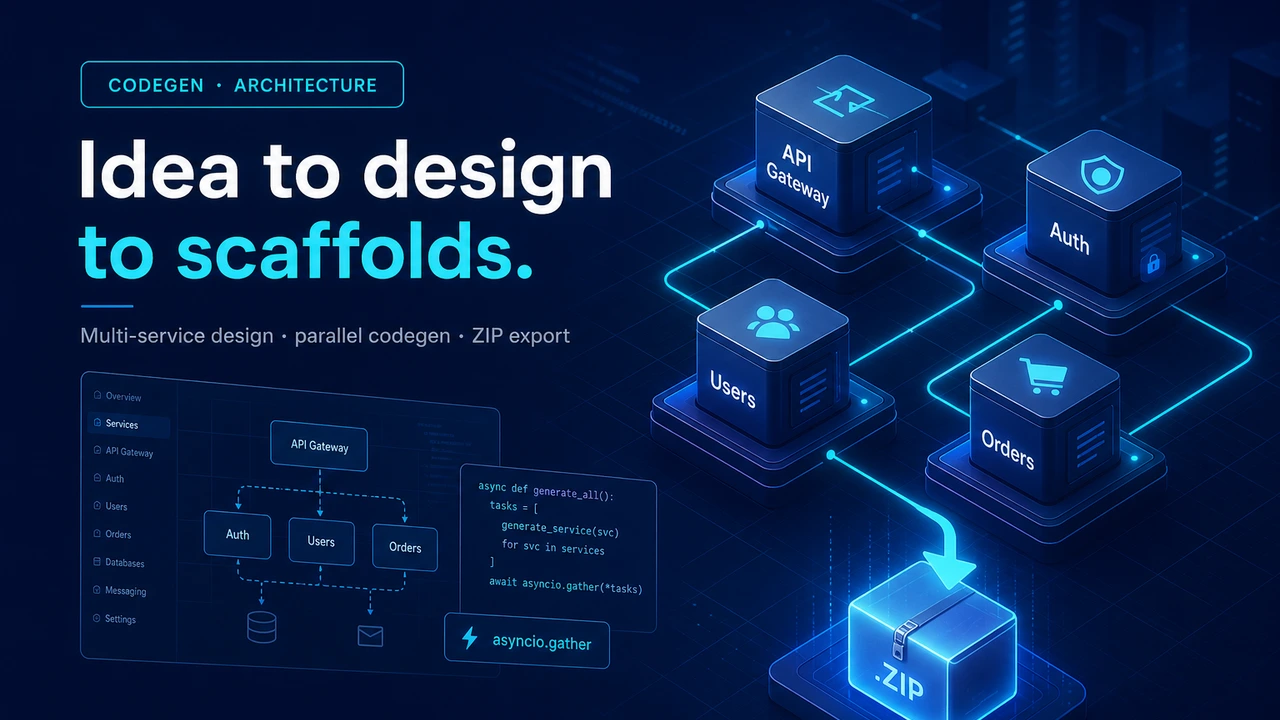
Multi-Service System Design Agent: From a One-Sentence Idea to Generated Microservice Scaffolds

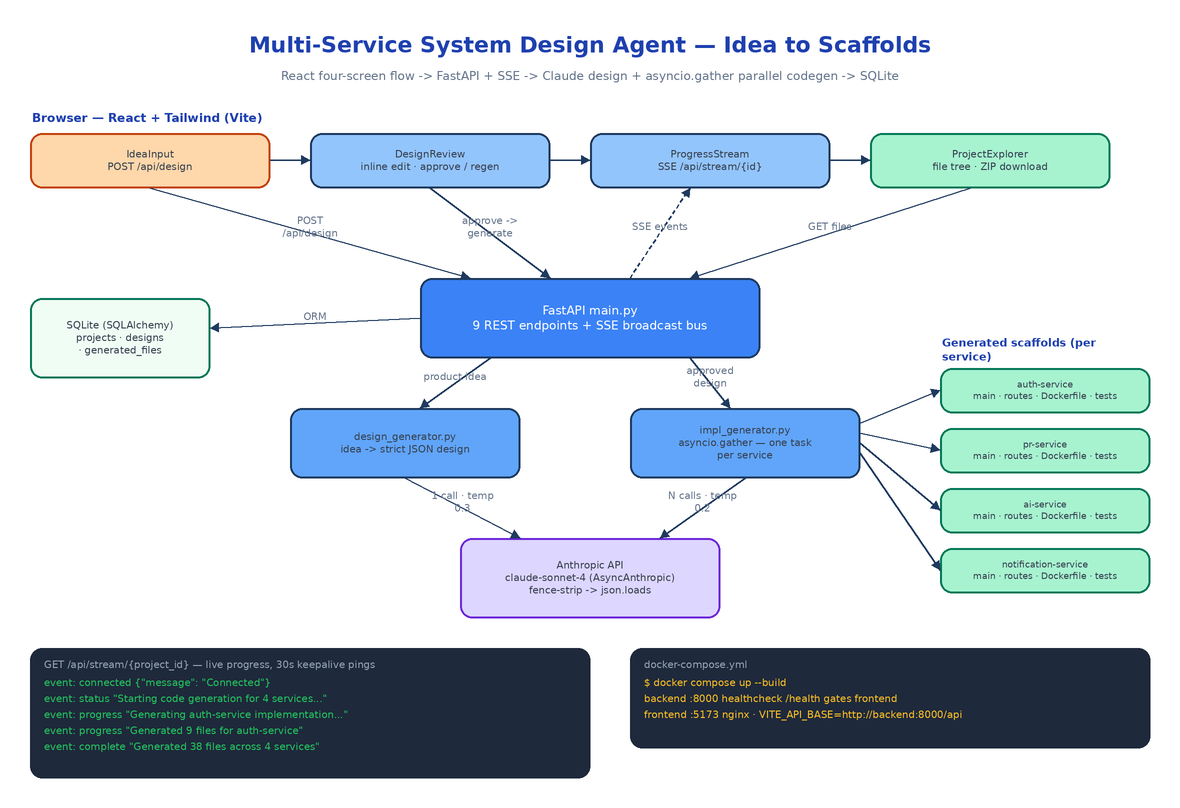 Architecture
The Problem
The whiteboard session goes well. Six services, clean boundaries, everyone nods. Then someone has to turn the photo of the whiteboard into actual repos — and the next two days disappear into
mkdir, copy-pasted Dockerfiles, FastAPI boilerplate that is 90% identical across services, and adocker-compose.ymlthat nobody enjoys writing. By the time the first endpoint returns JSON, half the design decisions are already drifting from what was on the board.
The gap between "we know what we want to build" and "there is code to iterate on" is mostly mechanical work, and mechanical work is what LLMs are good at — if you put a human checkpoint in the right place. The Multi-Service System Design Agent is a web app that does exactly that: you type a product idea, Claude produces a structured system design, you review and edit it in the browser, and on approval the backend fans out one Claude call per service in parallel and streams scaffold generation progress back over Server-Sent Events. At the end you browse every generated file in a tree explorer and download the whole project as a ZIP.
Four Screens, One State Machine
The React frontend (App.tsx) is a small state machine with four page states: input → review → generating → explore. Each state maps to one component and a specific slice of the API.
IdeaInput is a text area. Submitting it calls POST /api/design, which creates a Project row, sets its status to generating_design, and calls Claude.
DesignReview renders the returned design as collapsible sections — overview, architecture pattern, per-service definitions, data flow, deployment, security, scalability — each in a <textarea> you can edit directly. Two buttons: approve, or regenerate with your edits via POST /api/design/approve with action: "regen".
ProgressStream opens an EventSource to GET /api/stream/{project_id} and renders generation events as they arrive. A deliberate ordering detail in App.tsx: the page transitions to generating before firing POST /api/generate, and the generate call is fire-and-forget — so the SSE subscription exists before the backend emits its first event, and no progress is lost.
ProjectExplorer fetches GET /api/projects/{id}/files, renders a file tree grouped by service with syntax highlighting, and builds the ZIP download client-side.
Design Generation: Forcing Claude into a Schema
backend/services/design_generator.py is the first Claude integration. The system prompt pins the model to an exact JSON shape — title, overview, architecture.pattern, a services array where every service carries name, language, framework, dependencies, api_endpoints, database_tables, and external_integrations, plus data_flow, deployment, api_gateway, security, and scalability — and ends with "Output ONLY valid JSON. No markdown fences, no extra text."
Models do not always listen to that last line, so the parser defends itself: it strips leading and trailing ``` fences before json.loads. The call runs through AsyncAnthropic at temperature=0.3 with max_tokens=4096, defaulting to claude-sonnet-4-20250514 (overridable via MODEL_NAME, with automatic OpenRouter routing when OPENROUTER_API_KEY is set instead of ANTHROPIC_API_KEY).
Error handling is typed all the way up: a missing key or unparseable response raises ValueError, which main.py maps to HTTP 400; an API failure raises RuntimeError, mapped to HTTP 502 with an AI service error detail. Rate limits and invalid keys surface as structured JSON errors, not anonymous 500s.
A Human Checkpoint Before Any Code Exists
Nothing gets generated until a person approves the design. POST /api/design/approve takes one of two actions. approve flips design_approved on the project and marks the latest Design row approved. regen accepts the user-edited design JSON, stores it as a new row in the designs table with an incremented version, and resets approval — so every iteration of the design is kept, and the thing the code generator consumes is exactly the JSON the user signed off on, edits included.
POST /api/generate refuses to run otherwise:
if not project.design_approved:
    raise HTTPException(status_code=400, detail="Design must be approved before code generation")
Parallel Scaffolding with asyncio.gather
When generation starts, main.py extracts the services array from the approved design and builds one generate_service_impl(...) coroutine per service, then runs them all at once:
results = await asyncio.gather(*tasks, return_exceptions=True)
A 5-service design issues 5 concurrent Claude calls, so wall-clock time is roughly the cost of one service, not five. Each call (impl_generator.py, temperature=0.2, max_tokens=8192) receives both the individual service definition and the full design for cross-service context, and must return a JSON array of {file_path, content, language} objects covering the entry point, routes, models, config, requirements.txt, and a Dockerfile. The validator rejects anything that is not a list or is missing one of the three keys.
The return_exceptions=True matters. Results are partitioned into successes and failures; failures are broadcast as SSE error events naming the service. If every service fails, the project is marked failed and — crucially — the previously generated files are left untouched. Only after at least one service succeeds does the endpoint delete the old generated_files rows and write the new scaffold. A flaky API call never wipes a working previous generation.
Live Progress Without Polling
The SSE layer is a small in-memory event bus in main.py: a dict[int, list[asyncio.Queue]] keyed by project ID. _broadcast pushes {event, data} payloads to every subscriber queue (dropping dead full queues), and GET /api/stream/{project_id} subscribes a fresh queue and yields text/event-stream frames from it. If nothing happens for 30 seconds, the generator emits a ping keepalive so proxies don't kill the connection; X-Accel-Buffering: no keeps Nginx from buffering the stream in the Docker setup.
The generators report through a progress callback that broadcasts progress events, so the browser sees the actual lifecycle:
event: connected  {"message": "Connected"}
event: status     {"message": "Starting code generation for 5 services..."}
event: progress   {"message": "Generating auth-service implementation..."}
event: progress   {"message": "Generated 9 files for auth-service"}
event: complete   {"message": "Generated 42 files across 5 services"}
The API Surface and the Data Model
Nine endpoints plus a health check cover the whole lifecycle:
| Method | Path | What it does |
|---|---|---|
| POST | /api/design | Product idea in, structured JSON design out |
| POST | /api/design/approve | approve or regen with edits (versioned) |
| POST | /api/generate | Parallel scaffold generation for all services |
| GET | /api/stream/{project_id} | SSE stream of generation events |
| GET | /api/projects | List projects |
| GET | /api/projects/{id} | Project with its design |
| GET | /api/projects/{id}/files | All generated files |
| GET | /api/files/{id} | Single file content |
| GET | /health | Healthcheck (gates the frontend container) |
SQLAlchemy manages three tables on SQLite: projects (idea, status, approved design JSON), designs (every design version as a JSON artifact), and generated_files (one row per scaffold file with service_name, file_path, content, language). init_db() runs in the FastAPI lifespan hook, so a fresh checkout needs zero database setup. The frontend's api/client.ts wraps every endpoint in typed fetch helpers, with TypeScript interfaces in types/index.ts mirroring the backend's Pydantic schemas.
Two Containers and a Healthcheck
docker compose up --build runs the whole thing. The backend builds into a slim Python container on port 8000 with a curl -f http://localhost:8000/health healthcheck; the frontend builds the Vite bundle into an Nginx container on 5173 and declares depends_on: condition: service_healthy, so the UI never comes up pointing at a backend that isn't ready. Configuration is three environment variables: ANTHROPIC_API_KEY (required, read only from the environment — no keys in source), DATABASE_URL (defaults to sqlite:///./projects.db), and VITE_API_BASE for the frontend.
The backend ships 17 pytest tests across test_design.py and test_impl.py — schema validation, error handling, markdown-fence stripping — all with mocked Claude calls, so the suite runs in under a second.
How to Build This with NEO
Open NEO in VS Code or Cursor and describe what you want to build. A good starting prompt for this project:
"Build a web app that turns a plain product idea into a complete multi-service system design and generated code scaffolds. FastAPI backend (Python 3.11) with nine REST endpoints plus an SSE stream: POST /api/design calls Claude via AsyncAnthropic with a system prompt that forces a strict JSON design schema (services, api_endpoints, database_tables, deployment, security); POST /api/design/approve supports approve and regen actions with design versioning; POST /api/generate fans out one Claude call per service with asyncio.gather(return_exceptions=True), validates returned {file_path, content, language} arrays, preserves old files if all services fail, and broadcasts progress over an in-memory queue bus to GET /api/stream/{project_id} with 30-second keepalive pings. Store projects, designs, and generated_files in SQLite via SQLAlchemy with init on startup. React + TypeScript + Tailwind frontend with four states: IdeaInput, DesignReview with inline-editable textareas per section, ProgressStream over EventSource, and ProjectExplorer with a file tree, syntax highlighting, and ZIP download. Ship docker-compose with a backend healthcheck gating an Nginx frontend container, keys only from environment variables, and pytest coverage with mocked Claude calls."
NEO scaffolds the FastAPI app, both Claude integrations, the SSE event bus, the SQLAlchemy models, all four React components, and the docker-compose setup. From there you point the implementation generator at your own stack conventions — swap the per-service prompt to emit Go or TypeScript services, add a step that pushes each scaffold to its own Git repo, or wire the design JSON into your existing infrastructure-as-code.
NEO built the pipeline that turns a whiteboard sentence into reviewable architecture and running scaffolds. See what else NEO ships at heyneo.com.
Try NEO in Your IDE
Install the NEO extension to bring AI-powered development directly into your workflow:
- VS Code: NEO in VS Code
- Cursor: Install NEO for Cursor