
Long-Horizon Agent Benchmark: GLM 5.1 vs Kimi K2.6 vs DeepSeek V4 Pro on 50+ Step Tasks

 Architecture
The Problem
Standard benchmarks test what a model knows. Long-horizon agent tasks test something different: whether the model keeps doing the right thing across 50+ sequential steps, when each step depends on the last, and when accumulated errors compound. Most models look similar at step 5. The interesting question is what happens at step 40, does the model stay coherent, or does it start hallucinating tool results it hasn't seen?
NEO built this benchmark to plot quality against tool-call count for each model, finding the inflection point where each model's coherence starts to degrade.
Results (run: 2026-04-28)
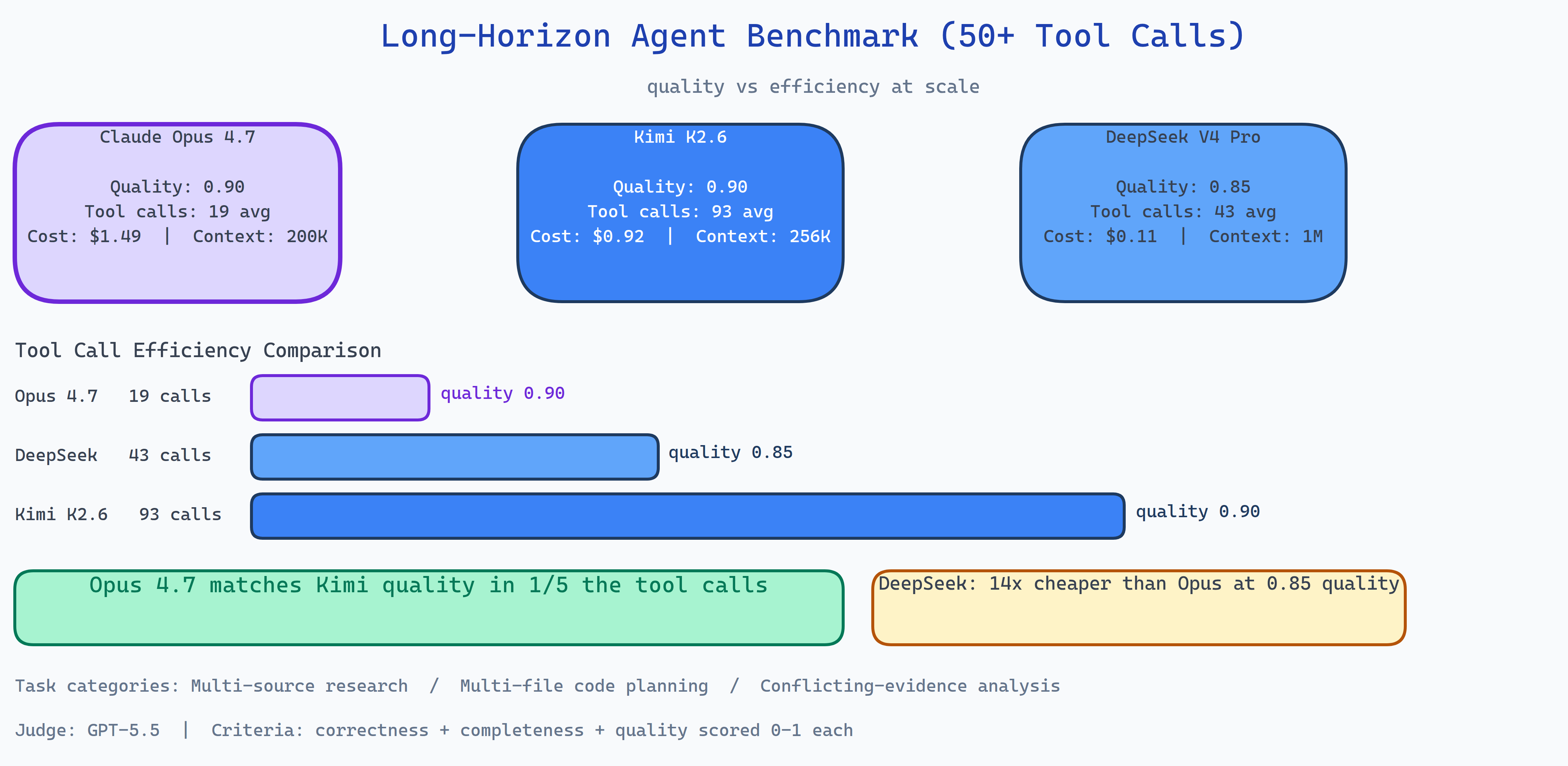
| Metric | Claude Opus 4.7 | Kimi K2.6 | DeepSeek V4 Pro |
|---|---|---|---|
| Quality score | 0.90 | 0.90 | 0.85 |
| Tool calls (avg) | 19 | 93 | 43 |
| Cost per run | $1.49 | $0.92 | $0.11 |
| Context window | 200K | 256K | 1M |
Opus 4.7 and Kimi K2.6 tied on quality at 0.90, identical final answer scores from an independent GPT-5.5 judge. The difference is that Opus reached that quality in 19 tool calls where Kimi needed 93. Kimi's extended reasoning mode is thorough but expensive in time and tool budget.
DeepSeek V4 Pro achieved 0.85 quality at $0.11 per run, roughly 14× cheaper than Opus. For applications where 5% quality reduction is acceptable, the cost argument is compelling.
What the Benchmark Measures
Standard agent evals measure whether the agent completes the task. This benchmark measures an additional dimension: efficiency under quality constraint. The scoring framework plots:
- Quality vs tool-call count: does the model degrade as the task gets longer?
- Quality per dollar: what's the cost of reaching 0.90 quality?
- Coherence at depth: does the model maintain goal state correctly at step 40+?
Tasks are structured to require genuine long-horizon reasoning: research tasks that require synthesizing information across 10+ sources, coding tasks that require planning a multi-file refactor, analysis tasks that require reconciling conflicting evidence across a long document set.
The Judge
All final answers are scored by an independent GPT-5.5 judge on three dimensions: correctness (0–1), completeness (0–1), and quality (0–1). The final score is the arithmetic mean. The judge sees the final answer only, not the tool calls, so its verdict reflects output quality, not process efficiency.
The Opus Insight
The most operationally useful finding: Opus 4.7 reaches 0.90 quality in 19 tool calls. Kimi reaches the same quality in 93. For applications with tool-call budgets or latency constraints, this is a decisive difference. Kimi's 256K context window and extended reasoning aren't necessary to produce a 0.90-quality answer on these tasks, Opus gets there more directly.
The implication is that context window size and extended reasoning are not quality guarantors. They're capabilities that can be used well or inefficiently.
How to Build This with NEO
Open NEO in VS Code or Cursor and describe what you want to build. A good starting prompt for this project:
"Build a long-horizon agent benchmark comparing Claude Opus 4.7, Kimi K2.6, and DeepSeek V4 Pro on tasks requiring 50+ tool calls. Design tasks in three categories: multi-source research synthesis, multi-file code planning, and conflicting-evidence analysis. Track tool-call count, quality score, cost per run, and context window usage per task. Score final answers using an independent GPT-5.5 judge on correctness, completeness, and quality. Plot quality vs tool-call count curves for each model. Record per-step coherence scores to find the degradation inflection point. Support --only <task_id>, --max-steps, and --budget-cap flags."
NEO scaffolds the task framework, the multi-model runner, the per-step coherence tracker, the cost accumulator, the judge integration, and the quality-vs-tool-calls chart generator. From there you iterate: add a fourth model, design domain-specific long-horizon tasks for your use case, or add a budget-cap flag that stops the benchmark when cost reaches a threshold to simulate production constraints.
To run the finished project:
git clone https://github.com/dakshjain-1616/-Long-Horizon-Agent-Benchmark-GLM-5.1-vs-Kimi-K2.6-vs-DeepSeek-V4-Pro
cd Long-Horizon-Agent-Benchmark
pip install -r requirements.txt
cp .env.example .env  # add API keys

python run_benchmark.py               # full benchmark run
python run_benchmark.py --only task_01  # single task
python run_benchmark.py --max-steps 30  # cap tool calls per run
NEO ran a long-horizon agent benchmark finding that Opus 4.7 matches Kimi K2.6 quality at 1/5 the tool calls and DeepSeek V4 Pro delivers competitive quality at 14× lower cost, the efficiency story at 50+ step tasks is completely different from standard evals. See what else NEO ships at heyneo.com.
Try NEO in Your IDE
Install the NEO extension to bring AI-powered development directly into your workflow:
- VS Code: NEO in VS Code
- Cursor: Install NEO for Cursor