
Kokoro 82M vs Supertonic 3: A Real CPU TTS Benchmark

A complete evaluation of two open-weight TTS models across speed, latency, throughput, and audio quality — run entirely on CPU, no GPU involved.
There are a lot of TTS benchmarks floating around that test on high-end hardware, cherry-pick favorable configurations, or only report one metric. This one tries to be more honest. We ran Kokoro 82M and Supertonic 3 head-to-head on a CPU, measured everything that actually matters for a production decision, and listened to the outputs.
The short version: the fastest configuration is not the one you should ship.
 RTF Comparison by Configuration
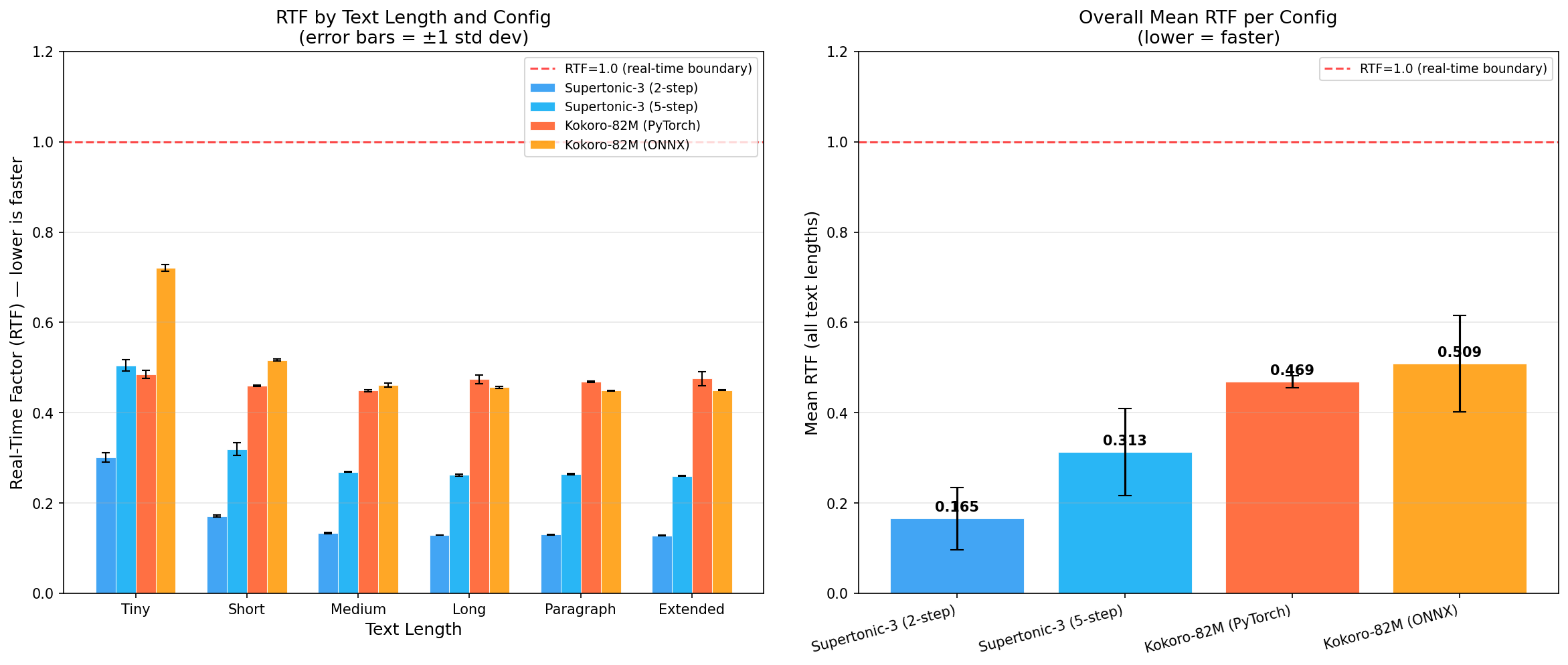
Mean RTF per configuration (from results/charts/rtf_comparison.png in the benchmark repo). Lower is faster.
The Models
Kokoro 82M is a StyleTTS2-inspired model with 82 million parameters. It was released under Apache 2.0 (weights included), which is rare for a model of this quality. It outputs 24kHz audio and has two deployment paths: a native PyTorch pipeline via the hexgrad/Kokoro-82M HuggingFace repo, and an ONNX version from onnx-community/Kokoro-82M-v1.0-ONNX that is roughly 80MB quantized. At the time of its release it ranked first on the HuggingFace TTS Arena leaderboard.
Supertonic 3 is a newer model from Supertone with roughly 99 million parameters. Its architecture uses a Vector Estimator flow-matching backbone, which means the number of inference steps is a tunable parameter at runtime via total_steps. Lower steps = faster but lower quality. It supports 31 languages and outputs 44.1kHz audio. The license is OpenRAIL-M, which has some commercial use restrictions.
What We Measured
The benchmark ran 4 configurations:
- Supertonic-3 at
total_steps=2(speed mode) - Supertonic-3 at
total_steps=5(default quality) - Kokoro-82M via PyTorch CPU
- Kokoro-82M via ONNX Runtime CPU
Each configuration was tested across 6 text lengths: tiny (12 chars), short (59), medium (196), long (483), paragraph (851), and extended (1712 characters). Every cell got 5 timed repetitions after one discarded warmup run. That is 120 total timed runs.
The primary metric is RTF (Real-Time Factor): wall-clock synthesis time divided by the duration of the audio produced. RTF below 1.0 means the model synthesizes faster than real-time. Lower is faster.
We also recorded wall-clock latency in seconds, throughput in characters per second, and saved one audio sample per configuration per text length (24 WAV files total) for listening.
Hardware: AMD EPYC 7763, 4 cores available, 15.6GB RAM, no GPU. CUDA_VISIBLE_DEVICES was set to empty for all runs. ONNX sessions were forced to CPUExecutionProvider.
The Numbers
RTF by Configuration and Text Length
| Config | Tiny | Short | Medium | Long | Paragraph | Extended | Mean |
|---|---|---|---|---|---|---|---|
| Supertonic-3 (2-step) | 0.301 | 0.171 | 0.133 | 0.129 | 0.130 | 0.128 | 0.165 |
| Supertonic-3 (5-step) | 0.505 | 0.320 | 0.269 | 0.262 | 0.263 | 0.260 | 0.313 |
| Kokoro-82M (PyTorch) | 0.485 | 0.460 | 0.449 | 0.474 | 0.469 | 0.476 | 0.469 |
| Kokoro-82M (ONNX) | 0.721 | 0.517 | 0.461 | 0.457 | 0.449 | 0.450 | 0.509 |
All four configurations run faster than real-time. Supertonic at 2-step is the fastest by a significant margin, reaching RTF 0.128 on extended text (nearly 8x real-time). Kokoro sits around RTF 0.45–0.51 across most text lengths.
Wall-Clock Latency (seconds)
| Config | Tiny | Short | Medium | Long | Paragraph | Extended |
|---|---|---|---|---|---|---|
| Supertonic-3 (2-step) | 0.42s | 0.73s | 1.82s | 4.39s | 8.11s | 15.39s |
| Supertonic-3 (5-step) | 0.70s | 1.36s | 3.67s | 8.93s | 16.46s | 31.27s |
| Kokoro-82M (PyTorch) | 0.74s | 1.86s | 5.62s | 14.39s | 24.83s | 52.60s |
| Kokoro-82M (ONNX) | 0.68s | 1.81s | 5.51s | 14.02s | 23.50s | 46.77s |
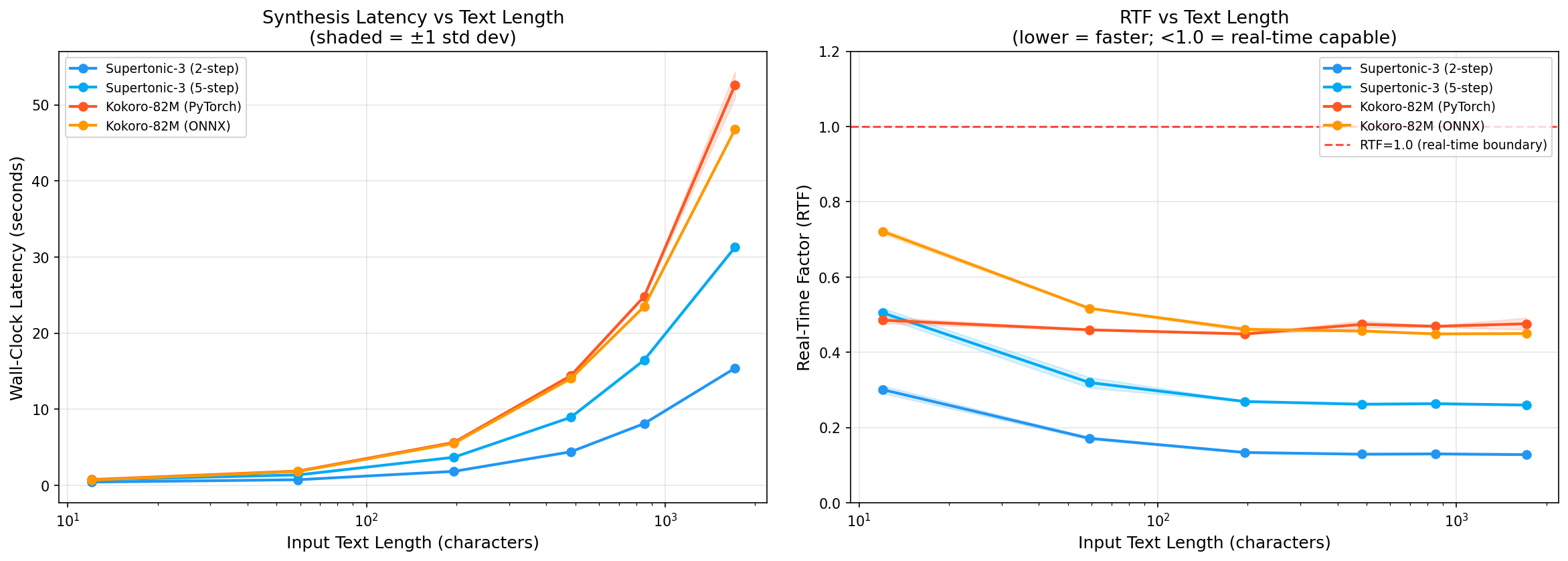
For a short sentence (59 chars), Supertonic at 2-step takes 0.73 seconds. Kokoro takes about 1.8 seconds. At extended length (1712 chars), the gap widens: 15 seconds vs 47–53 seconds.
Throughput (chars/sec)
| Config | Tiny | Short | Medium | Long | Paragraph | Extended |
|---|---|---|---|---|---|---|
| Supertonic-3 (2-step) | 28.7 | 81.2 | 107.6 | 110.0 | 104.9 | 111.3 |
| Supertonic-3 (5-step) | 17.1 | 43.5 | 53.4 | 54.1 | 51.7 | 54.7 |
| Kokoro-82M (PyTorch) | 16.2 | 31.7 | 34.9 | 33.6 | 34.3 | 32.6 |
| Kokoro-82M (ONNX) | 17.7 | 32.6 | 35.6 | 34.4 | 36.2 | 36.6 |
A Note on RTF Scaling
 Latency vs Text Length
Wall-clock latency in seconds as text length grows (results/charts/latency_vs_length.png). The gap between Supertonic and Kokoro widens significantly at longer inputs.
Both models show higher RTF (slower relative to audio duration) on very short texts. This is expected: there is a fixed per-call overhead from tokenization, model graph setup, and silence padding that dominates when the actual audio is only a second or two long.
Supertonic shows the sharpest drop from tiny (RTF 0.30) to medium (RTF 0.13), a 2.3x improvement. This suggests its per-call overhead is larger relative to its steady-state throughput. Kokoro's RTF is more stable across lengths (0.45–0.72), which points to a different internal chunking strategy where cost per chunk is more uniform.
The practical implication: if you are synthesizing lots of short utterances (chatbot responses, voice assistant replies), the RTF advantage of Supertonic shrinks. At medium and longer texts, the gap is more pronounced.
Audio Quality: Where the Story Changes
RTF numbers alone would make Supertonic the obvious choice. But we listened to the 24 audio samples, and the picture is more complicated.
The text used for the short samples below is the classic pangram: "The quick brown fox jumps over the lazy dog." — a standard TTS test sentence that exercises most phonemes in English.
Supertonic-3 at 2-step sounds robotic. Words blur together and some are difficult to make out. This is not a bug or a configuration error. It is a fundamental property of flow-matching models: fewer denoising steps means less refinement of the waveform. At 2 steps, the model has not converged enough to produce clean speech. The RTF of 0.165 is impressive on paper, but the output is not something you would put in front of a user.
Supertonic-3 (2-step) — short text:
Supertonic-3 at 5-step is a different story. The audio is clearly intelligible, fully audible, and usable. It lacks some of the warmth and natural prosody variation you get from Kokoro, but it is not robotic. If you are building something where latency is the primary constraint and you can accept slightly flat delivery, this is a reasonable choice.
Supertonic-3 (5-step) — short text:
Kokoro 82M (both PyTorch and ONNX) produces human-like speech. The prosody is natural, the pacing feels right, and it does not sound like a TTS system in the way older models do. The PyTorch and ONNX variants are perceptually indistinguishable in quality.
Kokoro-82M (PyTorch) — short text:
Kokoro-82M (ONNX) — short text:
The quality gap is even more obvious on longer text. Here are the medium samples (196 chars, 2–3 sentences on AI) — the point where Supertonic's RTF advantage is most pronounced but the quality tradeoff is also most audible:
Supertonic-3 (2-step) — medium text:
Kokoro-82M (PyTorch) — medium text:
One thing worth noting: Kokoro ONNX is marginally slower than PyTorch on tiny texts (RTF 0.72 vs 0.49) due to higher per-call overhead in the ONNX runtime. At medium and longer texts it catches up and edges ahead slightly. If you are doing a lot of short utterances, the PyTorch pipeline is actually faster.
The Combined Picture
| Config | Mean RTF | Quality | Practical Verdict |
|---|---|---|---|
| Supertonic-3 (2-step) | 0.165 | Poor (robotic, unclear) | Prototyping only |
| Supertonic-3 (5-step) | 0.313 | Good (clear, intelligible) | Latency-critical apps |
| Kokoro-82M (PyTorch) | 0.469 | Excellent (human-like) | Quality-first, PyTorch stack |
| Kokoro-82M (ONNX) | 0.509 | Excellent (human-like) | Quality-first, lightweight deploy |
The effective speed winner for production-grade audio is Supertonic-3 at 5-step: RTF 0.313, 3.2x real-time, and clearly usable output. It is 1.5x faster than Kokoro while still being intelligible.
If audio quality is a requirement, Kokoro 82M wins. It is slower (RTF ~0.47–0.51), but the output quality is in a different league from Supertonic at any step count. It is also Apache 2.0, which matters for commercial use.
How This Benchmark Was Run
This evaluation was produced by Neo, an autonomous AI engineering agent. The entire process started from a single prompt: run a comparative CPU TTS benchmark between Supertonic 3 and Kokoro 82M.
From that prompt, Neo:
- Researched both models to understand their architectures, APIs, available backends, and known benchmarks
- Designed the benchmark methodology: 4 configs, 6 text lengths, 5 reps, warmup protocol, CPU-only enforcement
- Wrote the full benchmark harness (
benchmark.py) with correct API calls for all four configurations - Ran the benchmark end-to-end, collecting 120 timed runs and saving 24 audio samples
- Wrote the report generator (
report.py) to compute statistics and produce charts - Generated the full analysis including the quality assessment after listening to the audio samples
One thing worth mentioning: the Supertonic API required some investigation. The synthesize() method requires a Style object obtained via tts.get_voice_style('F1'), not a plain string. The return value is a tuple where result[0] is the audio array with shape (1, N) that needs to be flattened. This is not immediately obvious from the documentation, and Neo figured it out by inspecting the library and testing against the actual API. For the Kokoro ONNX model, the model files (311MB ONNX + 27MB voices binary) needed to be downloaded separately, which Neo handled via curl since wget was not available in the environment.
These are the kinds of things that would slow down a manual setup. Neo handled them autonomously as part of the run.
Replicate or Extend This Benchmark
The full benchmark code, raw results, charts, and audio samples are in the benchmark repository.
git clone https://github.com/gauravvij/kokoro-tts-vs-supertonic-3-tts.git
cd kokoro-tts-vs-supertonic-3-tts
The key files:
benchmark.py— the full harness, runs all 120 timed experimentsreport.py— readsresults/raw_results.csv, generates the markdown report and chartsresults/raw_results.csv— raw timing data, 120 rowsresults/benchmark_report.md— the full reportresults/charts/— RTF comparison and latency vs text length chartsresults/audio_samples/— 24 WAV files for quality listening
To re-run the benchmark from scratch, you need Python 3.10+, espeak-ng installed system-wide, and the Python packages: supertonic, kokoro, kokoro-onnx, onnxruntime, soundfile, matplotlib, pandas, numpy, torch. The Kokoro ONNX model files need to be downloaded to a models/ directory (see the download commands at the top of benchmark.py).
What You Can Build on Top of This
If you want to extend this benchmark or build something new using Neo, here are some directions that make sense given what is already here:
Extend the benchmark:
"Add Coqui XTTS-v2 as a fifth configuration to the existing benchmark harness and re-run the comparison"
"Add a MOS (Mean Opinion Score) evaluation step using a UTMOS or DNSMOS model to replace the subjective quality assessment with an automated score"
"Re-run the benchmark with 8 CPU cores instead of 4 and report the scaling behavior"
Build something with the models:
"Build a FastAPI TTS service that uses Kokoro 82M ONNX for synthesis, with a /synthesize endpoint that accepts text and returns a WAV file"
"Build a streaming TTS pipeline with Supertonic 5-step that chunks long text and streams audio chunks as they are synthesized"
"Fine-tune Kokoro on a custom voice dataset using the existing benchmark environment"
Analysis:
"Generate a statistical significance report for the RTF differences between Kokoro PyTorch and Kokoro ONNX across all text lengths"
"Plot the RTF variance (not just mean) across the 5 repetitions to show measurement stability"
Neo works as an autonomous agent in VS Code or Cursor via the Neo extension. You give it a goal, it plans the implementation, writes the code, runs it, and iterates until it works. The benchmark in this repo is a good starting point for any of the above.
Files in This Repo
benchmark.py                    # Full benchmark harness
report.py                       # Report and chart generator
results/
  raw_results.csv               # 120 rows of raw timing data
  benchmark_report.md           # Full analysis report
  charts/
    rtf_comparison.png          # Grouped bar chart by config
    latency_vs_length.png       # Line chart across text lengths
  audio_samples/                # 24 WAV files (1 per config x text length)
Hardware: AMD EPYC 7763, 4 cores, 15.6GB RAM, no GPU. Python 3.11. supertonic 1.2.3, kokoro 0.9.4, onnxruntime 1.26.0, torch 2.12.0.
Evaluation harness and all result files: https://github.com/gauravvij/kokoro-tts-vs-supertonic-3-tts
Built by Neo
Try NEO in Your IDE
Install the NEO extension to bring AI-powered development directly into your workflow:
- VS Code: NEO in VS Code
- Cursor: Install NEO for Cursor