
Kimi won on engineering capability. GLM won on craftsmanship. Neither is production-ready as-is.

Using NEO's Bring Your Own Key (BYOK) functionality, we ran GLM 5.2 and Kimi K2.6 through the same NEO agent workflow in the NEO VS Code extension, swapping only the model behind the key. Both runs looked successful. Both got the same citation wrong in opposite ways. The gap only showed up when we inspected pipeline artifacts, not final reports. Here is what we found.
TL;DR
Comparison: GLM 5.2 vs Kimi K2.6 agent evaluation via NEO BYOK in VS Code
Winner: Kimi K2.6 (engineering capability) · GLM 5.2 (code craftsmanship)
Test: Same NEO agent workflow on langchain-ai/open_deep_research, with the same prompt, tools, and MCP environment. Only the model changed.
What we found: Article 75 had 95 valid citations. GLM silently recorded 95 as broken. Kimi loudly flagged 100% failure, then fixed it in a later stage without reconciling the two numbers.
Harness: NEO BYOK swaps the model behind identical orchestration, isolating model capability from tooling noise.
What We Tested
We ran a qualitative agent workflow comparison, not a benchmark leaderboard. We held the NEO orchestration layer constant and changed one variable: the LLM behind the key. Each model got one full run on a real data-engineering task inside a real open-source repository, producing real code and real artifacts.
Full methodology, category scores, and verified evidence are in the GitHub evaluation report.
Model Overview
| GLM 5.2 | Kimi K2.6 | |
|---|---|---|
| Developer | Z.ai | Moonshot AI |
| Release date | June 13, 2026 | April 20, 2026 |
| Architecture | MoE | MoE |
| Total parameters | 744B | 1.1T |
| Active parameters / token | ~40B | 32B |
| Context window | 1M tokens | 262K tokens |
| Max output | 131,072 tokens | Up to 262K (mode-dependent) |
| License | MIT | Modified MIT |
Specs from Z.ai GLM 5.2 docs and Moonshot Kimi K2.6 as of June 2026. This post evaluates agent behavior on a data-engineering workflow, not benchmark leaderboard scores.
What Is NEO BYOK?
NEO BYOK (Bring Your Own Key) is a feature of the NEO platform. It lets you connect your own LLM provider API key (Anthropic, OpenAI, or OpenRouter) to the NEO VS Code or Cursor extension. NEO still handles the agent workflow: planning phases, reading the repository, calling tools, running MCP servers, and writing code. Your provider bills you directly for model usage.
- NEO = the orchestration layer (workflow, tools, file edits, multi-phase execution)
- BYOK = your API key, your model choice, your billing dashboard
- Why it mattered here: NEO BYOK let us run GLM 5.2 in one session and Kimi K2.6 in another with zero changes to prompts, tools, or environment
Learn more: Bring Your Own LLM Keys · NEO BYOK overview
What Is open_deep_research?
The test ran inside langchain-ai/open_deep_research, LangChain's open-source deep-research agent built on LangGraph. The repo is configured for evaluation against Deep Research Bench: 100 PhD-level research tasks across 22 domains, with reports scored by a RACE metric (repo README).
We did not run the leaderboard. We asked each model to perform a data-engineering audit of the benchmark dataset stored in that repo: inventory what exists, check citation integrity, deduplicate records, enrich rows with quality metadata, and adversarially review the output.
The Test Setup
Both models ran inside the NEO VS Code extension via BYOK. Same repository, same prompt, same tools, same MCP environment. The only variable we changed was the model behind the key.
Each model was asked to:
- Inventory the benchmark datasets
- Audit citation integrity across records
- Deduplicate entries
- Enrich each row with quality metadata
- Score hallucination and traceability risk
- Adversarially review the work and back every claim with evidence
One run per model. Real pipelines, real artifacts, real code.
- One pipeline reported: "95 citations, 0 resolved, 100% citation failure (CRITICAL)."
- The other silently recorded
broken_citation_count: 95and said nothing.
From the outside, both runs looked like complete successes.
What Is Article 75?
Article 75 is a single record in the Deep Research Bench dataset (index 75). It is a GPT-5-generated research report that cites 95 sources correctly. The body marks claims with bracketed references [1] through [95]. The Sources section lists all 95 entries as a numbered list (1., 2., … 95.). Every citation resolves. A human reviewer would call it well-sourced.
That makes it a useful trap. Citation parsers that only look for bracketed references in the Sources section will find nothing in a numbered list, and may treat "no matches" as "no sources resolve."
What We Found at a Glance
| Dimension | GLM 5.2 | Kimi K2.6 | Winner |
|---|---|---|---|
| Architecture | Single-pass tool | Staged pipeline | ✅ Kimi |
| Reproducibility | Final output only | Per-stage artifacts persisted | ✅ Kimi |
| Deduplication | Not implemented | SHA-256 content hash | ✅ Kimi |
| Error handling | None around json.loads | try/except + type checks | ✅ Kimi |
| Data correctness (Article 75) | Wrong (95), silent | Correct (0) in final data | ✅ Kimi |
| Self-verification | Re-reads its own output | Summary only | ✅ GLM |
| Portability | Relative paths | Hardcoded absolute paths | ✅ GLM |
| Final winner | Code craftsmanship | Engineering capability | N/A |
What We Found: One Record, Three Answers
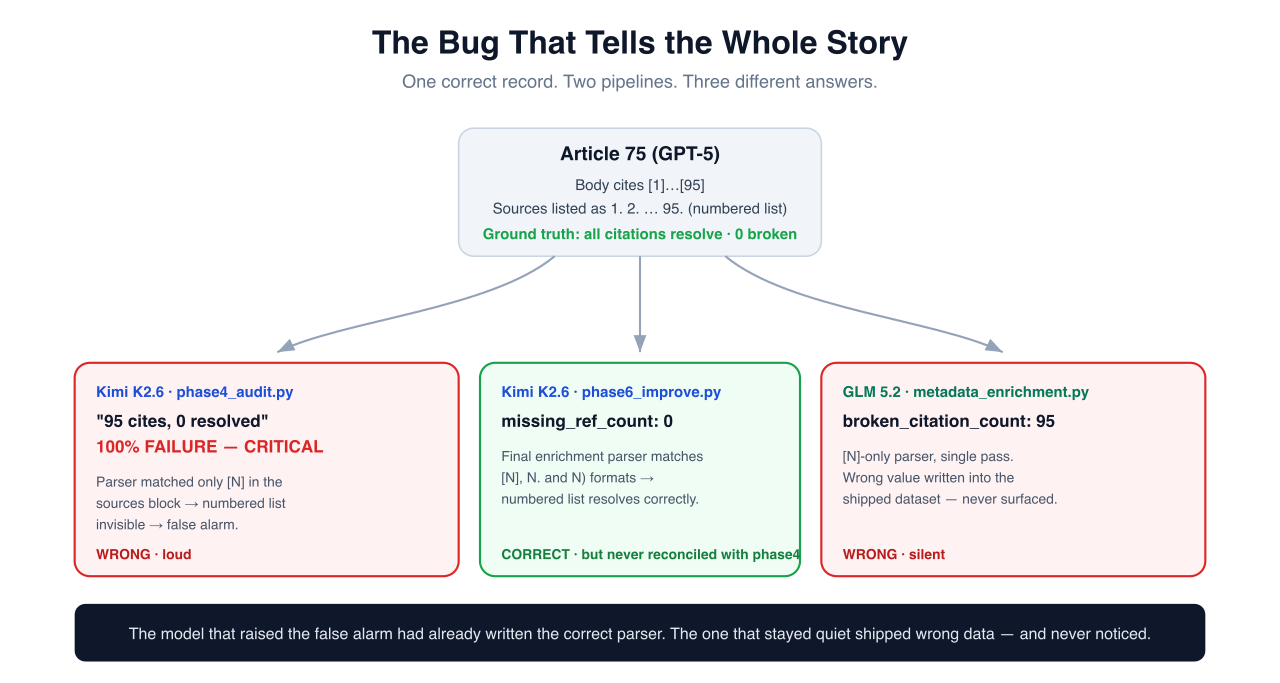 How one correct record produced three different answers
When we re-ran both pipelines against Article 75, our evaluation surfaced three different answers for the same correct record:
Article 75 (GPT-5): 95 references as a numbered list
Kimi K2.6 · phase4_audit.py   →  resolved=0  verdict="100% FAILURE"   [WRONG / loud]
Kimi K2.6 · phase6_improve.py →  missing_ref_count=0                 [CORRECT]
GLM 5.2   · metadata_enrich   →  broken_citation_count=95            [WRONG / silent]
Both runs failed for the same reason. The citation parser only matched bracketed references like [1] and [2]. Article 75 listed its sources as 1., 2., and so on, so the bracket search found nothing.
Kimi caught the bug in phase6 and rewrote the parser. It never went back to fix the phase4 number already sitting in the executive summary. GLM never caught it at all.
Kimi fixed it in code but shipped the wrong version. Early phase4 used the weak parser and produced the false alarm. By phase6, Kimi had a better three-format matcher:
m = re.match(r"^\s*(?:\[(\d+)\]|(\d+)[\.\)])", line.strip())
The final dataset records missing_ref_count: 0. The alarming phase4 number was still never reconciled against phase6 before the executive summary went out.
GLM never noticed. Its single-pass script used the weak parser throughout, stored broken_citation_count: 95 in the delivered dataset, and had no stage to inspect or recompute that value. The wrong number just sat in the shipped data.
Silence is not correctness.
Two Engineering Archetypes
Our comparison showed this was less about raw intelligence and more about how each model approaches engineering work.
Systems Builder (Kimi K2.6)
Strengths
- Staged pipeline with persisted JSON checkpoints per phase
- SHA-256 content hashing for real deduplication (implemented, not just asserted)
- Non-destructive data modeling: 15 new fields nested under
_metadata, originals untouched - Defensive validation:
try/exceptaroundjson.loads, type checks at ingestion
Blind spots
- Unreconciled seams between stages (the Article 75 gap)
- Hardcoded absolute paths, so the pipeline does not travel well across machines
Craftsman (GLM 5.2)
Strengths
- Fully portable: paths via
os.path.dirname(__file__), no hardcoded roots - Streaming line-by-line I/O with a flat memory footprint, even on large files
- Self-verifying:
main()re-reads its own output after writing - Well-documented: full docstrings, type hints, and calibrated enough to avoid false alarms
Blind spots
- No deduplication, so it assumes upstream data is already clean
- No error handling around
json.loads, and no multi-stage reconciliation
Pick the wrong archetype for the job and you get the wrong kind of failure.
When to Use Which
Use GLM 5.2 when:
- You need a self-contained, portable utility that others will read and maintain
- The task is single-phase and does not need intermediate checkpoints
- You want low operational complexity and minimal moving parts
- Memory efficiency and streaming I/O matter (large files, constrained environments)
- Repo-scale context matters (1M token window via
glm-5.2[1m])
Use Kimi K2.6 when:
- The workflow has multiple phases that each need auditable intermediate artifacts
- Data integrity matters more than code elegance (dedup, type validation, guarded parsing)
- You need the pipeline to self-correct and recompute across stages
- You would rather debug a loud wrong answer than miss a quiet one entirely
You can also use both together via NEO BYOK: GLM 5.2 for planning and architecture, Kimi K2.6 for instrumented multi-phase execution.
Scorecard by Category
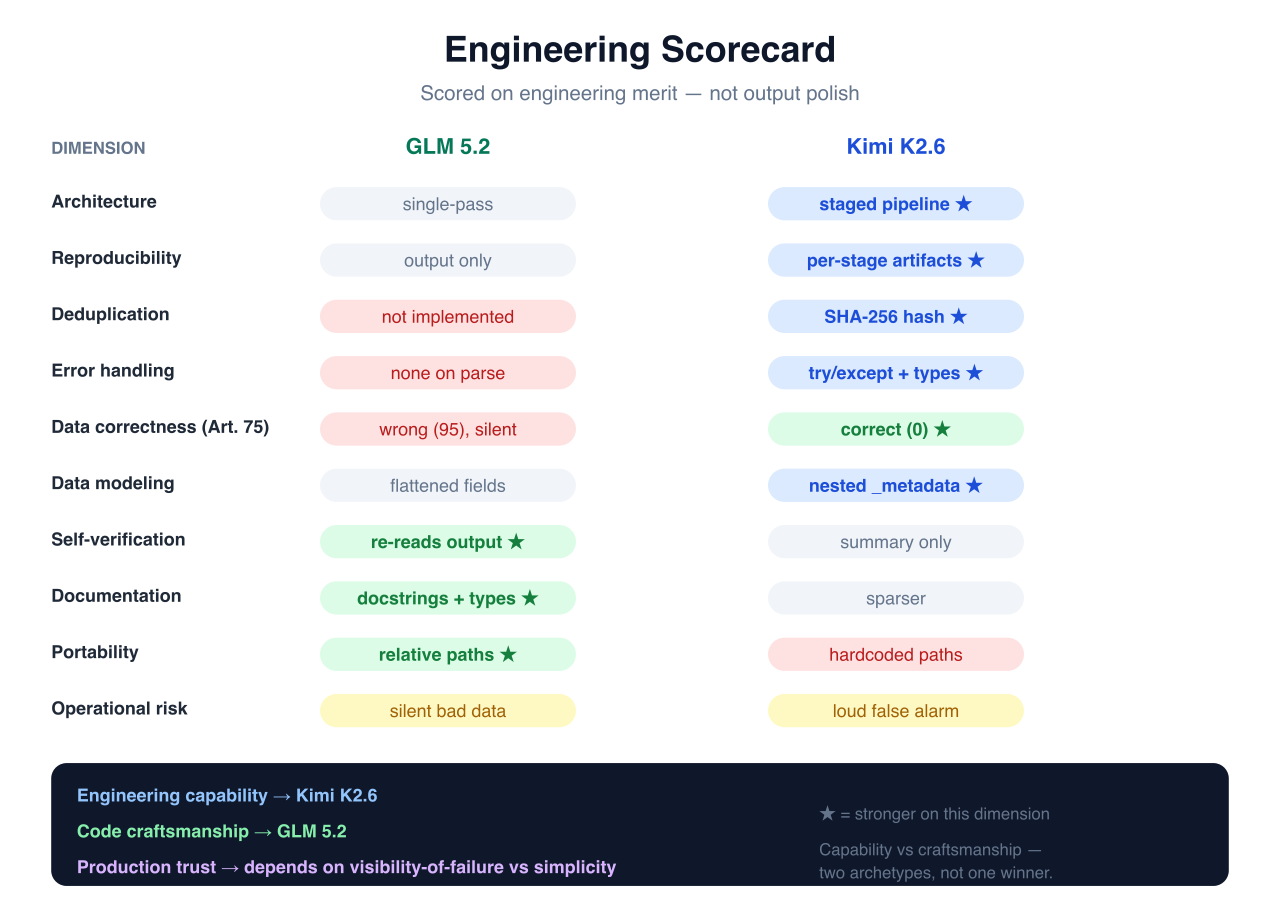 Engineering scorecard: capability vs craftsmanship
| Category | Winner | Why |
|---|---|---|
| Architecture | Kimi K2.6 | Staged, checkpointed pipeline vs single pass |
| Validation | Kimi K2.6 | Type/structure checks and guarded parsing |
| Error Recovery | Kimi K2.6 | Self-corrected its sampling bias in writing |
| Data Modeling | Kimi K2.6 | Non-destructive _metadata, content hashing |
| Traceability | Kimi K2.6 | Persisted intermediate artifacts per stage |
| Maintainability | GLM 5.2 | One legible, well-documented, portable tool |
| Simplicity | GLM 5.2 | Lower operational complexity, fewer seams |
| Documentation | GLM 5.2 | Full docstrings, type hints, self-verification |
| Operational Risk | Tie | Silent bad data (GLM) vs loud false alarm (Kimi) |
| Production Readiness | Neither | Both require edits before merge |
The Verdict
Engineering Capability: Kimi K2.6. We found real deduplication, robust multi-format parsing, a reproducible staged pipeline, and a final dataset that gets Article 75 correct.
Code Craftsmanship: GLM 5.2. We found portable, memory-efficient, well-documented code, careful enough to avoid false alarms but quiet enough to ship wrong data without noticing.
In production, the costs look different. GLM's silent wrong number can travel downstream unnoticed. A consumer might trust 95 broken citations on a clean article, and you might not find out until much later. Kimi's false alarm is annoying, but the artifact trail makes it diagnosable in minutes.
Both outputs would pass a superficial review. Our evaluation only exposed the gap when we inspected the process.
Run GLM 5.2 Yourself with NEO BYOK
NEO BYOK is built into the NEO VS Code and Cursor extension. Install the extension, open the LLM profile panel, and add a profile with your provider key and model slug. NEO handles the workflow; your provider handles billing.
Watch: connecting GLM 5.2 via OpenRouter in the Neo VS Code extension.
Setup steps
- Install the NEO extension from the VS Code Marketplace or Cursor
- Open the LLM profile panel in the extension sidebar and click Add LLM profile
- Name your profile (any label that helps you recognize it later, e.g.
GLM 5.2 OpenRouter) - Choose a provider type: Anthropic, OpenAI, or OpenRouter
- Add your API key and model slug for that provider (for GLM 5.2 via OpenRouter, use a slug like
z-ai/glm-5.2; confirm in the OpenRouter model list) - Save the profile, then select it when starting a task in Neo
The screenshots below and the video above walk through the same flow.
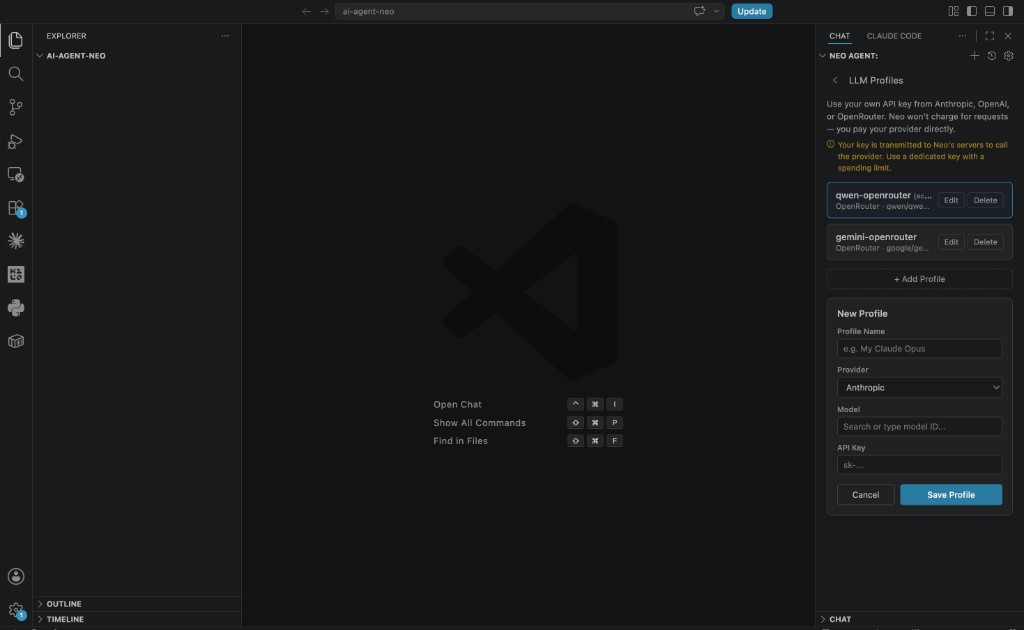 Neo LLM profile setup with provider keys
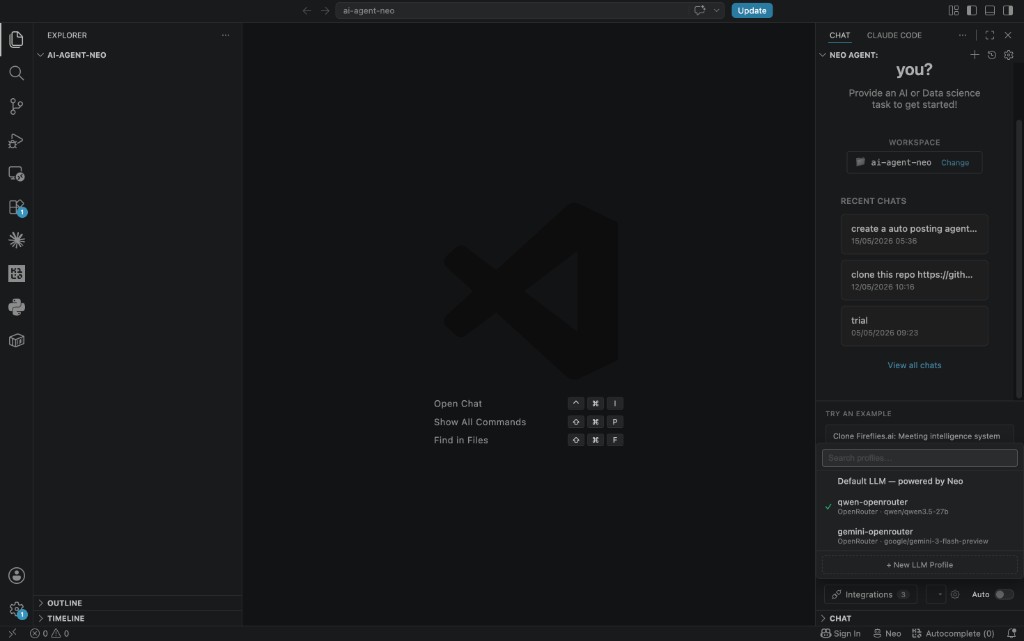 Selecting an LLM profile in the Neo chat panel
Full guide: Bring Your Own LLM Keys
Reproduce the Finding
The central Article 75 finding from our evaluation is reproducible in one command:
verify_article_75.pyreport.md(full audit: category scores, hallucination analysis, verified evidence)
If you run your own GLM 5.2 vs Kimi K2.6 comparison via NEO BYOK, four harness rules that would have caught Article 75:
- Persist intermediate artifacts, not just final deliverables
- Add reconciliation gates between stages that compute the same metric
- Recompute every number independently before trusting it
- Evaluate the process, not just the output