
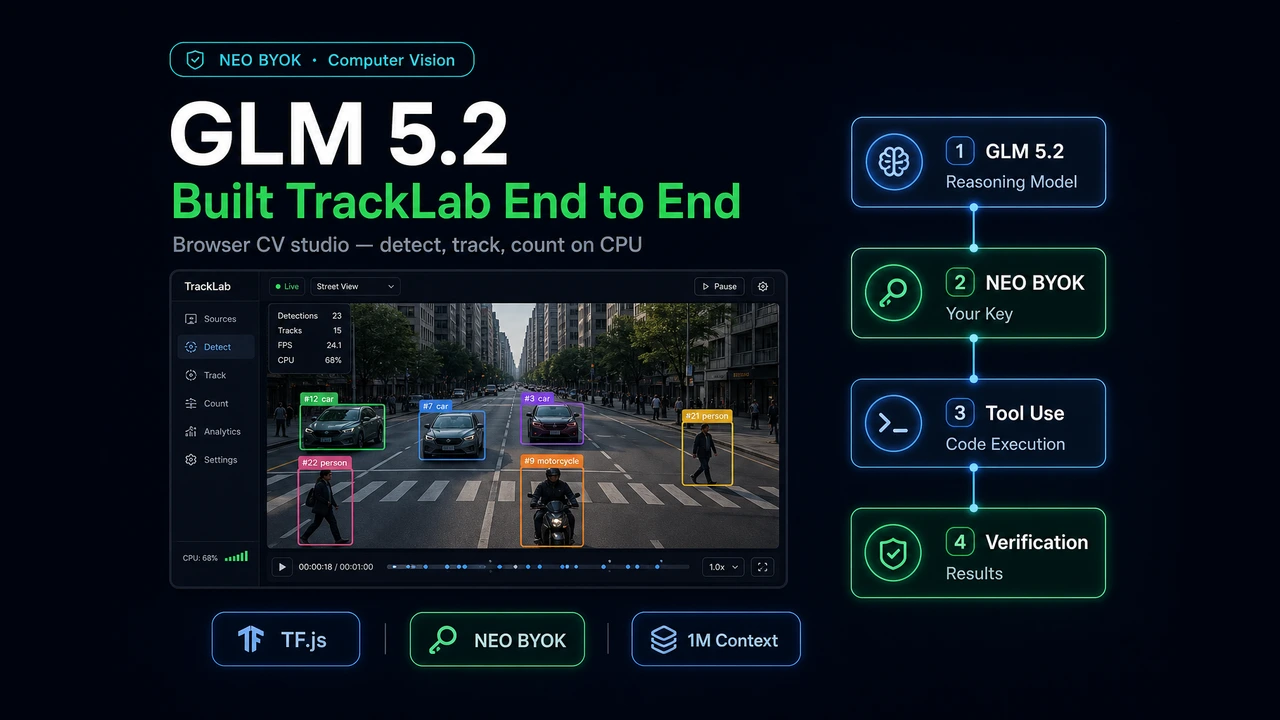
GLM 5.2 built TrackLab end to end through NEO BYOK — same agent workflow, different model.

TL;DR
What we built: TrackLab, a CPU-only computer vision studio that detects, tracks, and counts objects in any video, right in the browser.
How we built it: Entirely through NEO's Bring Your Own Key (BYOK) feature, with GLM 5.2 swapped in as the engine and the orchestration left untouched.
The model: GLM 5.2 plans before it codes, holds a multi-file project together, and verifies its own work.
The verdict: A 1,000,000 token context, top-tier planning, and frontier-class coding scores at a fraction of the price.
Most model comparisons stop at a benchmark table. We wanted something harder to fake. So we took a real machine learning engineering task, handed it to GLM 5.2, and let the model build the whole thing end to end. No toy snippet. A working app.
The twist is how we plugged GLM 5.2 in. We did not change our tools, our agent, or our process. We changed one thing: the underlying model. That is the entire point of the Bring Your Own Key (BYOK) feature in the NEO VS Code extension. The orchestration layer stays the same. You pick the engine.
This post walks through what we built, how GLM 5.2 handled it, and exactly how you can run the same experiment yourself.
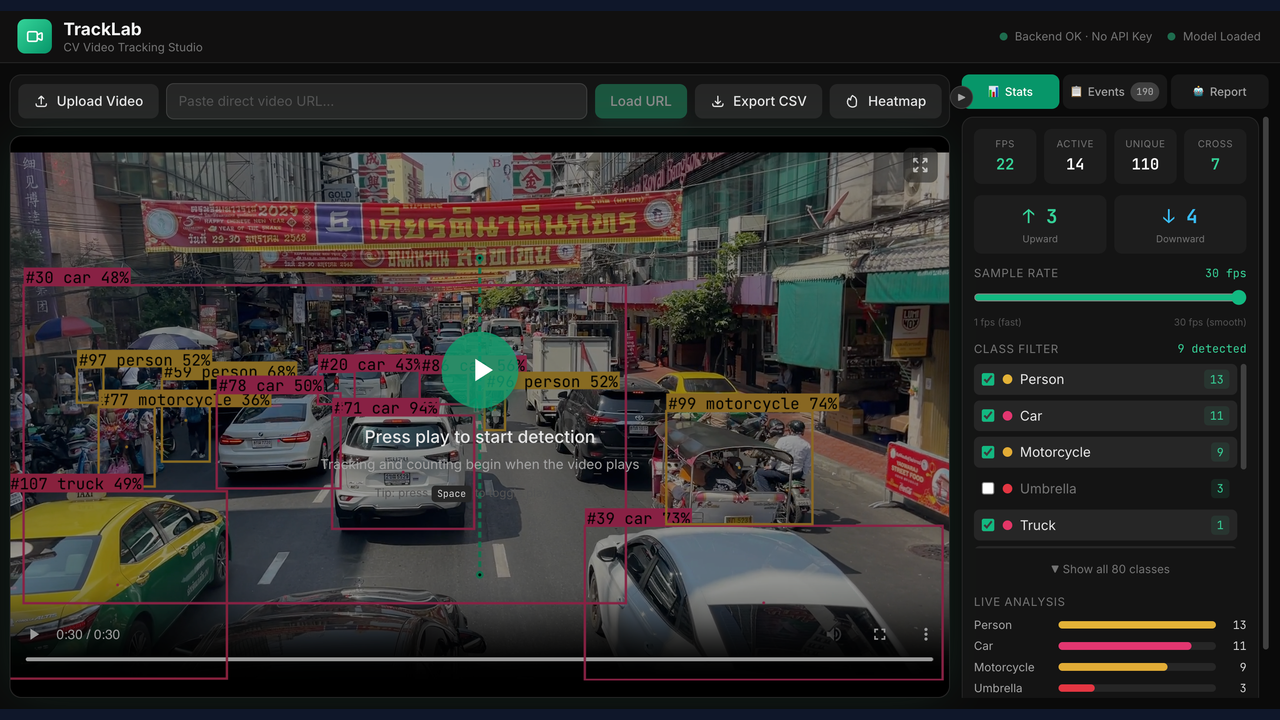 TrackLab tracking a busy Bangkok street scene: COCO-SSD detection boxes with stable track IDs on cars, people, motorcycles, and a truck, a draggable directional counting line, and the live stats and class-filter panel
TrackLab tracking a busy street scene entirely in the browser on CPU. Detection and tracking run with no API key; only the report panel needs one.
TrackLab tracking a busy Bangkok street scene: COCO-SSD detection boxes with stable track IDs on cars, people, motorcycles, and a truck, a draggable directional counting line, and the live stats and class-filter panel
TrackLab tracking a busy street scene entirely in the browser on CPU. Detection and tracking run with no API key; only the report panel needs one.
The Idea Behind BYOK
Agentic coding tools usually lock you into one model. You get whatever the vendor ships, and if you want to try a different model you switch tools and relearn everything.
NEO's Bring Your Own LLM feature breaks that link. The idea is right there in the way NEO frames it: NEO is the engineering layer, and your provider is the model layer. You add your own provider key in NEO settings, choose Anthropic, OpenAI, or OpenRouter, and run NEO tasks using your own model account. Planning, executing, debugging, and iterating all run exactly as before. The only variable that changes is the brain doing the reasoning.
It also means there is no hidden markup, no opaque model billing, and no forced model stack. Your keys, limits, access, and spend stay with your provider. NEO adds no charge on top.
This matters for one simple reason. If you want to honestly evaluate a model, you have to hold everything else constant. BYOK lets you do that. Same prompts, same tools, same task, different model. Whatever changes in the output is the model, not the harness.
So we used BYOK to point NEO at GLM 5.2 and gave it a job that a lot of models quietly fail.
The Task: Real-Time Object Detection in the Browser
We did not pick a generic CRUD app. We picked a computer vision task, because CV work forces a model to reason across math, performance, browser APIs, and a multi-stage pipeline at the same time. It is the kind of task where shortcuts show up fast.
The brief was a single sentence sketch:
Build a localhost studio where a user uploads a video or pastes a video URL, runs object detection in the browser on CPU, tracks each object with a stable ID, counts directional line crossings, and turns the results into a plain-language report.
GLM 5.2 turned that sketch into TrackLab, a working in-browser CV tracking studio. Here is what shipped:
TrackLab running live: detection, persistent track IDs, and directional counting on a real street scene, all on CPU.
- In-browser detection. TensorFlow.js with COCO-SSD on the
mobilenet_v2base, running entirely on CPU. No GPU, no CUDA, no Python vision stack. Detection happens in the browser tab. - Persistent tracking. A SORT-style tracker written in pure JavaScript. It matches detections frame to frame using IoU with a centroid-distance fallback, assigns stable track IDs, and ages out tracks after they go missing.
- Directional line counting. A draggable virtual line on the canvas. When a tracked object crosses it, the app records the direction using the sign of the cross product and tallies up and down separately.
- Live HUD and event log. Processing FPS, active and unique counts, a per-class breakdown, and a timestamped log of enter, cross, and leave events.
- The AI report layer. This is where GLM 5.2 also does runtime work. The tracking session gets summarized into structured JSON, sent to GLM 5.2 through OpenRouter, and returned as a readable activity report with overview, counts, crossings, anomalies, peak window, and recommendations.
- Extras. A class filter, a heatmap overlay of centroid density, CSV export, and a live cost readout that prices every request against the model's real token rates.
Under the hood the split is clean. All the vision (video player, COCO-SSD detector, SORT-style tracker, line counter, and report panel) runs in the browser on CPU, while a thin FastAPI backend does only three things: proxy remote videos same-origin, list available models, and relay the report call to OpenRouter.
So GLM 5.2 shows up twice in this project. It built the app, and it also powers the report feature inside the app. That second part made the model judge its own output format, which is a nice forcing function for clean design.
How GLM 5.2 Approached the Build
The thing that stood out was not raw code speed. It was planning. Independent reviews of GLM 5.2 keep landing on the same point, that its edge is judgment and long-horizon coherence rather than raw syntax speed, and that is exactly what we saw.
GLM 5.2 started by writing an actual plan. It researched the COCO-SSD load options, confirmed the OpenRouter API shape, and called out the non-obvious traps before writing a line of application code. Two of those calls were the kind a weaker model misses:
- Canvas tainting. Drawing a cross-origin video onto a canvas taints it and blocks pixel reads, which silently kills detection. GLM 5.2 caught this up front and designed a tiny FastAPI proxy that downloads remote videos and serves them same-origin. The detection pipeline never breaks, and the user never sees why.
- The CPU budget. It kept the detector on a CPU-friendly MobileNet base, ran TensorFlow.js on the WASM backend with a plain-CPU fallback rather than reaching for the GPU, and drove the loop with
requestVideoFrameCallbackplus a sample-rate throttle that only runs detection a few times per second. These are the decisions that keep a browser tab from freezing on a long video.
The model thinks about the system before it thinks about the syntax. The result is a clean runtime path: each video frame goes through COCO-SSD detection, the tracker assigns stable IDs, line crossings and events are recorded, the session is summarized into structured JSON, and GLM 5.2 turns that into a plain-language activity report.
The architecture it landed on kept the detector and tracker decoupled. The detector exposes a single detect(videoEl) call that returns a list of boxes, and the tracker only knows about that interface. That seam means you could swap COCO-SSD for a YOLO model later without touching the tracker. Nobody asked for that. The model designed for it anyway.
Where GLM 5.2 Pulled Ahead
A demo proves a model can write code once. A real product needs a model that can keep improving the same codebase without losing the thread. This is where GLM 5.2 was strongest, and a few moments made the case.
It made the right architecture call. Every detected object is tracked, and the class filter only controls what gets drawn on screen. That sounds small, but it is the difference between a filter that quietly drops data and one that behaves the way a user expects. Track IDs stay stable when you toggle a class, counts keep accumulating for hidden objects, and the report always sees the full picture. GLM 5.2 put the filter in the view layer, not the data path, which is a judgment call rather than a syntax choice.
It hardened the runtime where it counts. The line counter is the kind of feature that looks fine and then double-counts in a live demo. GLM 5.2 reasoned about it carefully: it kept the crossing cooldown in consistent time units so it actually fires, it skips tracks that are momentarily lost so an out-of-date position cannot trigger a phantom crossing, and it cleans up stale state as tracks leave the frame. These are the details that separate a demo from a tool you can trust on real footage.
It tuned detection quality with eyes open. It runs COCO-SSD on the mobilenet_v2 base for higher accuracy, with a confidence threshold low enough to catch partially hidden objects and a box cap high enough for busy traffic scenes. The tracker is tuned so IDs survive longer occlusions. And it surfaces the tradeoff plainly: the stronger base costs some CPU speed, with a sample-rate dial to tune it. You get accuracy and control, not a black box.
It optimized performance and UX on its own initiative. It lazy-loads TensorFlow.js, about 2.1 MB, as its own separate chunk, so the initial app bundle is just 185 KB and the UI is interactive almost immediately while the model loads in the background. It built an auto-detecting class filter that populates itself as objects appear in the video, plus a live analysis panel that shows what is being tracked at a glance. None of that was spelled out in the brief. The model saw what the product needed and built it.
The throughline is coherence. Across a large, evolving codebase, GLM 5.2 remembered its own decisions, kept the contracts consistent, and made each version better than the last.
How It Performed
A few honest observations from running the full build through NEO on GLM 5.2.
Long-horizon work held together. This was a multi-phase, multi-round build with a backend, a frontend, a CV pipeline, and a report layer, all of which had to agree on shapes and contracts. GLM 5.2 kept the structured summary format consistent across the tracker, the report panel, and the backend prompt. The JSON the frontend builds is the JSON the backend expects, which is the JSON the system prompt describes. That consistency over many edits and a large surface is exactly where a big context window earns its keep.
It verified its own work. After each change it ran the production build and confirmed the backend routes rather than just declaring success. That habit of checking instead of assuming is what makes an agentic model trustworthy on real code, and it is a big part of why every version of TrackLab actually ran.
The context window is the real advantage. GLM 5.2 ships with a roughly one million token context window. For a multi-file project where the model needs to hold the whole repo in view while it edits, that headroom is the difference between a coherent build and a model that forgets its own decisions halfway through. Reviewers tend to call this out as GLM 5.2's strongest card, and on a project like this it shows.
The output was thorough, sometimes more than asked. Across reviews, GLM 5.2 has a reputation for producing implementations that are complete rather than minimal. We saw the polish phase ship things the brief only hinted at, like the heatmap, the searchable model switcher, and graceful empty-state guidance when there is no tracking data yet.
The cost picture is attractive. GLM 5.2 is priced far below frontier proprietary models while landing in the same neighborhood on coding benchmarks. For an agentic workflow that burns a lot of tokens across planning, editing, and verification, that ratio matters more than a single benchmark point.
GLM 5.2 by the Numbers
These are Zhipu's published benchmark figures, not our own measurements, so treat them as vendor-reported context. Zhipu launched GLM 5.2 on June 13, 2026, released the open weights under the MIT license on June 17, and published the full benchmark suite on June 19, which is a cleaner signal than launch-day numbers.
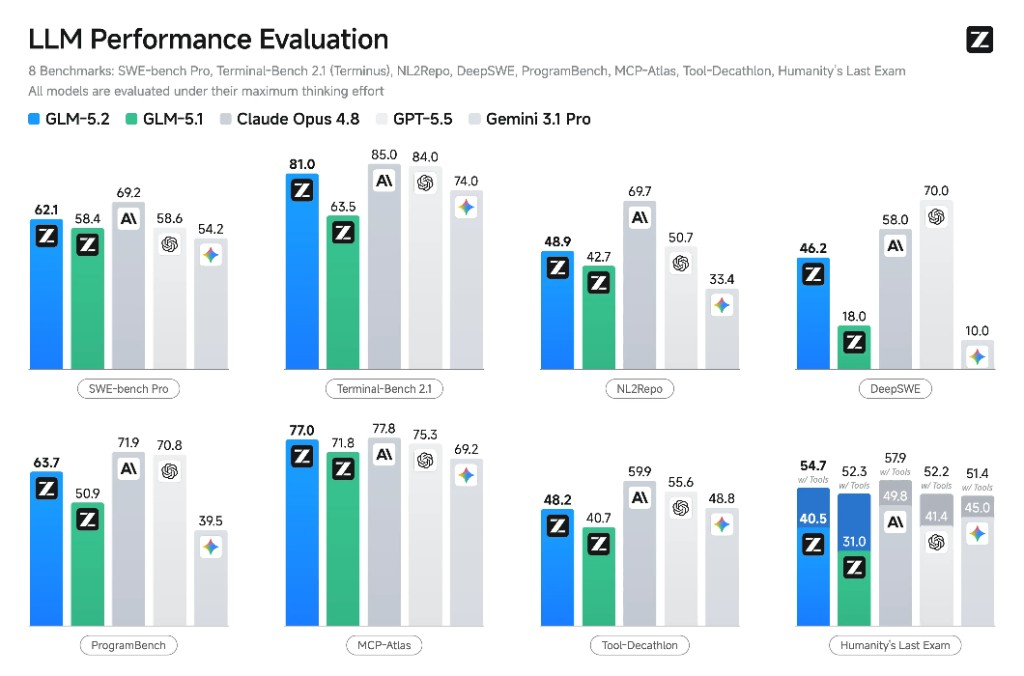 GLM 5.2 LLM Performance Evaluation across eight benchmarks
Vendor-reported benchmark comparison: SWE-bench Pro, Terminal-Bench 2.1, NL2Repo, DeepSWE, ProgramBench, MCP-Atlas, Tool-Decathlon, and Humanity's Last Exam.
GLM 5.2 LLM Performance Evaluation across eight benchmarks
Vendor-reported benchmark comparison: SWE-bench Pro, Terminal-Bench 2.1, NL2Repo, DeepSWE, ProgramBench, MCP-Atlas, Tool-Decathlon, and Humanity's Last Exam.
| Metric | GLM 5.2 |
|---|---|
| SWE-bench Pro | 62.1% |
| Terminal-Bench 2.1 | 81.0 |
| FrontierSWE | 74.4% |
| GPQA-Diamond | 91.2% |
| AIME 2026 | 99.2% |
| MCP-Atlas | 76.8 |
| Context window | 1,000,000 tokens |
| Parameters | ~753B (MoE, ~40B active) |
| License | MIT (open weights) |
| Price (input / output) | $1.40 / $4.40 per 1M |
Beyond the table, GLM 5.2 ranked first on Design Arena and second on Code Arena Frontend, and it topped the open-weight category of the Artificial Analysis Intelligence Index. On the long-horizon coding benchmarks it trails Claude Opus 4.8 by only about a point on FrontierSWE while staying ahead of GPT-5.5, which is strong company for an open model.
The rates above are Zhipu's published figures. On OpenRouter, where TrackLab actually runs the model, GLM 5.2 is billed at OpenRouter's live listed rate, and the app reads that rate at runtime for the in-app cost readout. Either way, GLM 5.2 sits well below frontier closed models per token.
The short version. You give up native image input and the very last few points of frontier performance. You get a huge context window, genuinely good planning, and a price that makes heavy agentic use practical.
When to use GLM 5.2
- Long context: a 1,000,000 token window that holds an entire repo, long logs, or a big task in a single pass.
- Strong planning: a model that designs the system before it writes the syntax.
- Low cost at scale: frontier-class coding scores without frontier pricing.
The one tradeoff: GLM 5.2 is text-first. If your task needs native image input, weigh that before you commit.
Try It Yourself: NEO BYOK in Three Steps
This is the part that makes the experiment repeatable. NEO runs as a VS Code and Cursor extension, and the setup is the same three steps NEO documents for any provider:
- Add your provider key in NEO settings. GLM 5.2 is served through OpenRouter, so create an OpenRouter key and add it to NEO.
- Choose your provider. Pick OpenRouter in Neo, then select GLM 5.2 (
z-ai/glm-5.2) as the model. NEO also supports Anthropic and OpenAI keys directly if you want to compare against those. - Run NEO tasks using your own model account. Hand NEO a one-sentence sketch like the one we used and let it plan, build, and verify. Then judge the result.
Your agent loop, tools, and prompts do not change. Only the model behind them does, and the billing stays on your own provider account with no markup from NEO.
Because BYOK keeps the orchestration constant, you can swap the model in step 2 and compare like for like. That is the cleanest way to find out which model actually fits your work, instead of trusting a leaderboard.
Learn more: Bring Your Own LLM Keys · NEO BYOK overview
What We Took Away
Two things.
First, BYOK changes how you evaluate models. When the harness is fixed, the comparison becomes honest. You stop arguing about whose tool is better and start seeing which model is better at your task.
Second, GLM 5.2 is a genuinely strong engineering model, and its strength is judgment. It plans before it codes, it catches the traps that quietly break CV and browser work, and it holds a large project together across many rounds of fixes. For the price, that combination is hard to argue with.
TrackLab runs on a plain CPU machine, in a browser tab, with detection, tracking, line counting, and an AI report layer that GLM 5.2 both built and powers. We gave it a short brief, and it planned, built, reviewed its own code, fixed the hard bugs, and shipped. That is the part a benchmark never shows you.
If you want to see how a model handles your kind of work, do not read another benchmark. Swap the engine and watch it build.
TrackLab was built with the NEO VS Code extension running GLM 5.2 through the BYOK feature. Detection and tracking run fully in the browser on CPU using TensorFlow.js. The activity report feature uses GLM 5.2 via OpenRouter and only needs an API key for that one panel.
Try NEO in Your IDE
Install the NEO extension to bring AI-powered development directly into your workflow:
- VS Code: NEO in VS Code
- Cursor: Install NEO for Cursor