

Fine-tune Dataset Quality Scorer: 0-100 Score Before You Spend GPU Hours

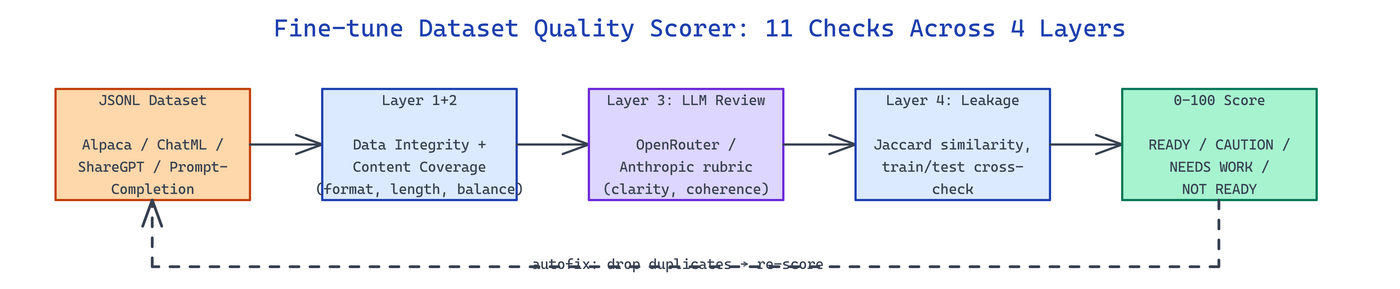 Pipeline Architecture
The Problem
Teams hit "start training" on JSONL datasets without knowing whether the file is full of duplicates, train/test leakage, malformed rows, or instruction-response mismatches — and the first signal something is wrong is a suspicious eval result three days later.
NEO built Fine-tune Dataset Quality Scorer to collapse that risk into a single readiness score you run before touching a GPU.
Eleven Checks Across Four Analysis Layers
Fine-tune Dataset Quality Scorer runs 11 automated checks organized into four stacked layers: Data Integrity (format, missing values, schema drift), Content Coverage (length distribution, language consistency, label balance), LLM-Based Review (instruction clarity, response quality, coherence), and Train/Test Leakage (cross-file contamination). Each check returns a sub-score and row-level findings.
dqs score dataset.jsonl --output report.html
dqs fetch yahma/alpaca-cleaned       # pull and analyze from Hugging Face
dqs llm-review dataset.jsonl
dqs crosscheck train.jsonl test.jsonl
Format auto-detection handles Alpaca, ChatML, ShareGPT, Prompt-Completion, and generic schemas without a config file — the scorer probes the first few rows and picks a parser.
Score Bands and Actionable Remediation
The composite score maps to four bands with an explicit verdict:
| Score | Band | Verdict |
|---|---|---|
| 92-100 | READY | Safe to train |
| 80-91 | CAUTION | Fix flagged rows then re-score |
| 60-79 | NEEDS WORK | Structural problems need patching |
| 0-59 | NOT READY | Rebuild before spending compute |
Every drop from 100 is traceable to specific row IDs and a recommended fix. Near-duplicates use Jaccard similarity on shingled tokens; the autofix mode can drop duplicates and re-score in a single command, so fixes are reproducible and show up in the next report as an upward score delta.
LLM Review and Domain Intelligence
The LLM review layer sends sampled rows to OpenRouter or Anthropic with a rubric prompt that scores clarity, instruction-response coherence, and domain fit on a 10-point scale. The reviewer also classifies domain type — coding, QA, translation, agentic — and highlights coverage gaps, like "85% of rows are beginner-level; consider adding intermediate and expert examples." Rich terminal output groups findings by severity; JSON output feeds dashboards; HTML output is meant for sharing with the rest of the team.
dqs score dataset.jsonl \
  --llm-review \
  --llm-provider openrouter \
  --llm-model meta-llama/llama-4-maverick \
  --output-format html \
  --output report.html
Typer provides the CLI scaffolding and 63 unit tests cover every check, which keeps the scoring deterministic across runs and reproducible in CI.
How to Build This with NEO
Open NEO in VS Code or Cursor and describe what you want to build. A good starting prompt for this project:
"Build a CLI quality scorer for JSONL fine-tuning datasets. Run 11 checks across four layers: data integrity, content coverage, LLM-based review via OpenRouter or Anthropic, and train/test leakage detection. Auto-detect Alpaca, ChatML, ShareGPT, and prompt-completion schemas. Assign a 0-100 composite score mapped to four bands with row-level remediation. Render with Rich terminal output and export JSON and HTML reports. Include an autofix mode that removes duplicates and re-scores."
NEO generates the project structure and core implementation. From there you iterate — add custom benchmarks, wire the score into a CI gate that blocks training below 80, or build a patch-then-rescore loop that iterates until a dataset reaches READY. Each request builds on what's already there.
To run the finished project:
git clone https://github.com/dakshjain-1616/Fine-tune-Dataset-Quality-Scorer
cd Fine-tune-Dataset-Quality-Scorer
pip install -r requirements.txt
dqs score examples/dataset.jsonl --output report.html
Open report.html for the score breakdown and row-level findings; run dqs autofix to apply remediation suggestions.
NEO built a pre-flight quality gate that turns "is this dataset training-ready?" into a single number plus a punch list. See what else NEO ships at heyneo.com.
Try NEO in Your IDE
Install the NEO extension to bring AI-powered development directly into your workflow:
- VS Code: NEO in VS Code
- Cursor: Install NEO for Cursor