
Deep Research Report Agent: From One Topic to a Book-Length, Fully-Cited Report

 Architecture
The Problem
You need a due-diligence memo on a market you barely know. The honest version of that work is forty browser tabs, a dozen contradictory sources, and a weekend of copying quotes into a doc while trying to remember which tab each claim came from. Ask a chatbot instead and you get three confident paragraphs with zero citations and no way to check any of it.
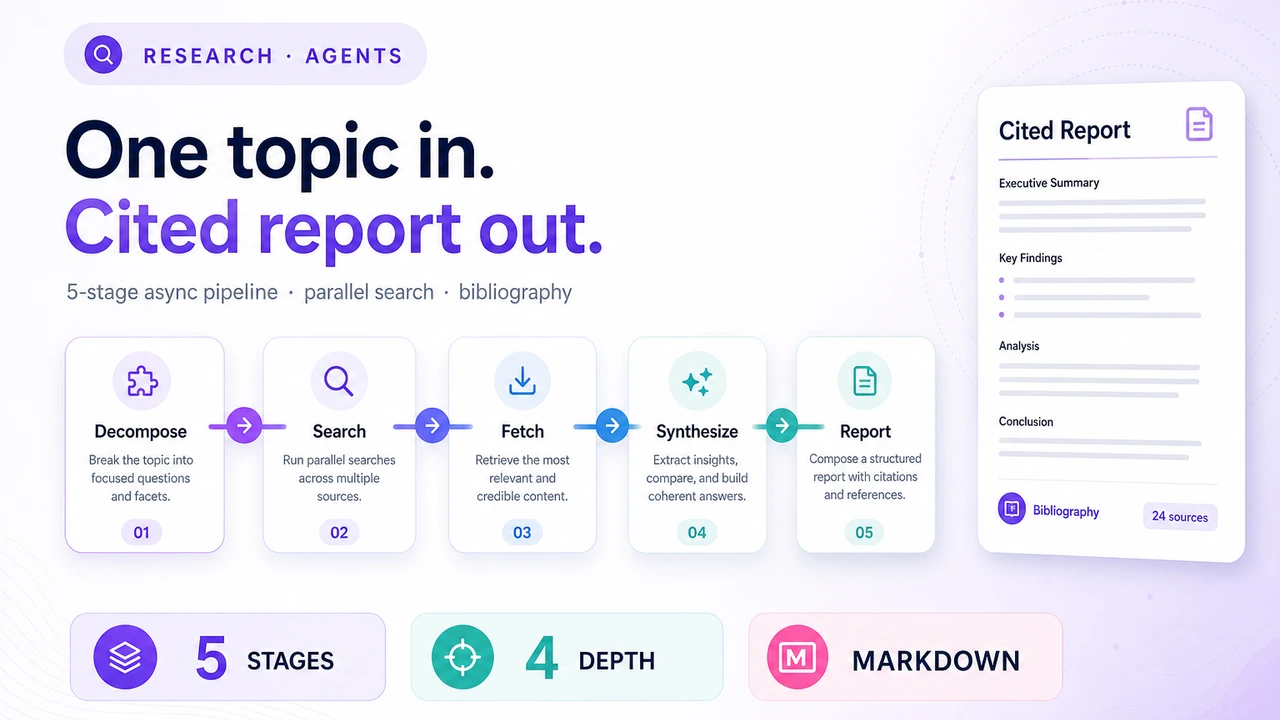
The gap between "ask an LLM" and "produce a real research report" is structural. A single prompt cannot cover a broad topic, a single context window cannot hold dozens of full web pages, and a single generation pass cannot keep citations honest across ten thousand words. Deep Research Report Agent closes that gap with a five-stage pipeline: decompose the topic into sub-questions, search and fetch real sources for each one in parallel, synthesize per-question findings with numbered citations, then assemble everything into a structured report with an executive summary, table of contents, and bibliography. Give it a topic and a depth level; get back Markdown you can actually hand to someone.
Five Stages, One Orchestrator
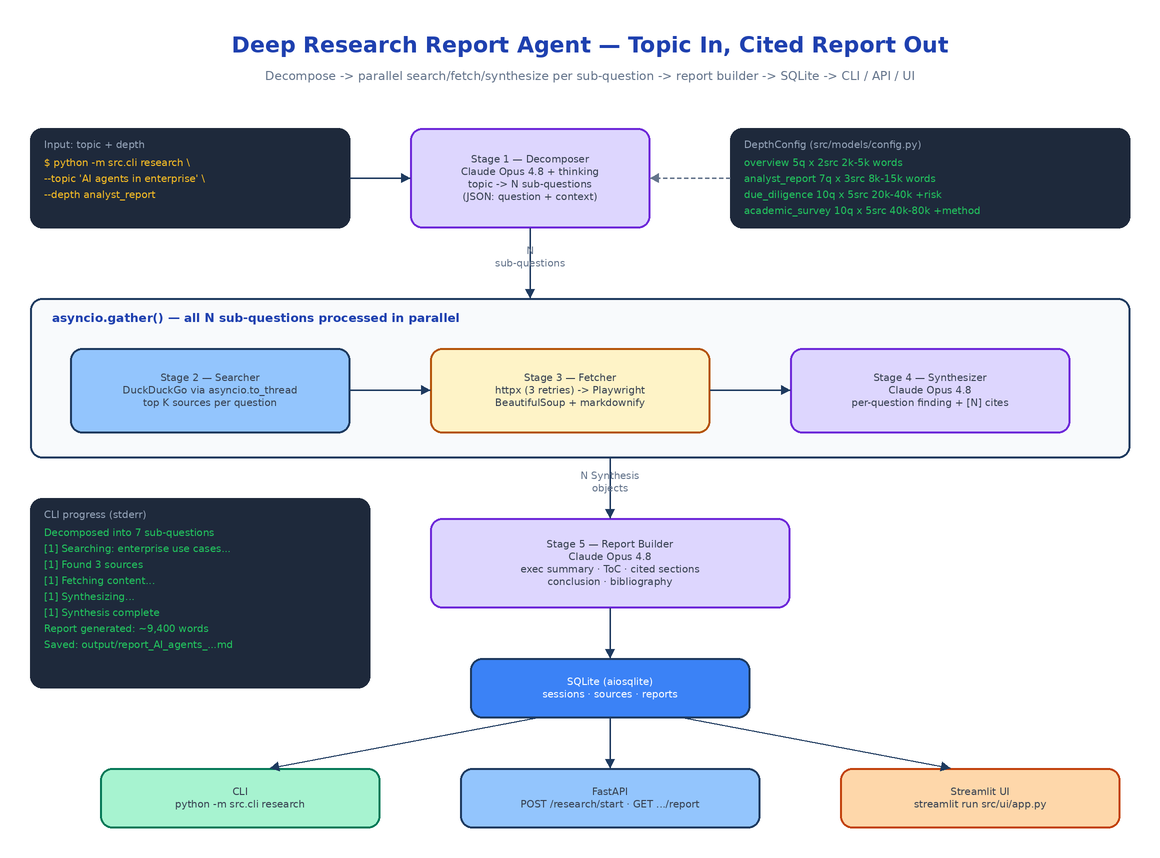
The whole pipeline lives in src/agent/, one module per stage, coordinated by orchestrator.py's run_research().
Stage 1 — Decompose (decomposer.py). Claude Opus 4.8, called through OpenRouter with extended thinking enabled ("thinking": {"type": "enabled", "budget_tokens": 8000}), receives the topic and returns a JSON array of sub-questions, each with a question and a context note explaining which aspect it covers. The system prompt forces non-overlapping, independently researchable questions — this stage gets the thinking budget because a bad decomposition produces a disconnected report no later stage can fix.
Stage 2 — Search (searcher.py). Each sub-question becomes a DuckDuckGo query via the duckduckgo_search library. The library is synchronous, so calls are wrapped in asyncio.to_thread to keep the event loop unblocked. It over-fetches at max_sources * 2 results and keeps the top N as Source objects with URL, title, and snippet.
Stage 3 — Fetch (fetcher.py). Every source URL is fetched with httpx.AsyncClient — three retries with linear backoff, a browser User-Agent, permanent failures (403/404/410) skipped immediately, PDFs skipped. If httpx comes back empty, a headless Playwright Chromium renders the page as a fallback for JS-heavy sites. The HTML then goes through a BeautifulSoup cleaning pass that strips nav, footers, sidebars, cookie banners, and anything matching a noise-pattern regex, finds the <main> or <article> content area, and converts it to Markdown with markdownify, truncated at 50KB per source.
Stage 4 — Synthesize (synthesizer.py). For each sub-question, Claude Opus 4.8 receives the question, its context note, and every fetched source (content or snippet, with fetch status marked). It writes a standalone finding with inline [1]-style citations keyed to source order, presenting both sides when sources disagree and explicitly flagging when sources failed to fetch.
Stage 5 — Build Report (report_builder.py). A final Claude call gets all syntheses plus a pre-built numbered bibliography and assembles the document: title page, 200–400 word executive summary, table of contents, one body section per sub-question with consistent citation numbering, conclusion, and a bibliography in [1] Title, URL, Accessed: YYYY-MM-DD format. The system prompt is blunt about quality: every paragraph cited, no placeholder text, no "further research needed" cop-outs.
Parallelism and Graceful Degradation
Stages 2–4 run per sub-question, and the orchestrator launches all of them concurrently:
tasks = [process_sub_question(sq, i) for i, sq in enumerate(sub_questions)]
await asyncio.gather(*tasks, return_exceptions=True)
Within each sub-question, source fetches are themselves gathered in parallel. return_exceptions=True is doing real work here: a DuckDuckGo query that returns nothing, a URL that times out, or a synthesis that fails marks that one sub-question failed and the pipeline keeps going. Only if every synthesis fails does the session drop to partially_completed — and even then the report builder runs with whatever survived. The 56-test suite (pytest tests/ -v) covers each stage in isolation plus exactly these degradation paths in the orchestrator.
Every transition is persisted to SQLite via aiosqlite and surfaced through a progress callback, so the session walks through decomposing → searching → fetching → synthesizing → building → completed with a progress_pct you can poll.
Depth Levels Change the Shape, Not Just the Length
Depth is a dataclass config (src/models/config.py), not a vibe. Each level fixes the sub-question count, sources per question, and target word range:
| Depth | Sub-questions | Sources/question | Target words | Special section |
|---|---|---|---|---|
overview | 5 | 2 | 2,000–5,000 | — |
analyst_report | 7 | 3 | 8,000–15,000 | — |
due_diligence | 10 | 5 | 20,000–40,000 | Risk Assessment |
academic_survey | 10 | 5 | 40,000–80,000 | Methodology Critique |
The special_sections field is the interesting part: due_diligence injects a mandatory Risk Assessment section into the report builder's prompt, and academic_survey adds a Methodology Critique. Deeper levels do not just write more words — they answer more questions from more sources and add the analytical sections that the report type demands.
Three Interfaces, One Pipeline
The CLI is the fastest path:
export OPENROUTER_API_KEY=sk-or-...

python -m src.cli list-depths
python -m src.cli research --topic "AI agents in enterprise software" \
    --depth analyst_report --output report.md
Progress streams to stderr while the report itself goes to stdout (and to output/report_<topic>_<timestamp>.md if you skip --output):
  Decomposed into 7 sub-questions:
    1. What are the primary enterprise use cases for AI agents today?
    ...
  [1] Searching: What are the primary enterprise use cases...
  [1] Found 3 sources
  [1] Fetching content...
  [1] Synthesizing...
  [1] Synthesis complete

  Report generated: ~9,400 words, status=completed
  Report saved to: output/report_AI_agents_in_enterprise_software_20260612.md
The FastAPI server runs the same pipeline as a background asyncio.Task, returning a session ID immediately:
| Method | Path | Description |
|---|---|---|
POST | /research/start | Start a session; returns session_id immediately |
GET | /research/{session_id}/status | Status, progress_pct, per-sub-question state |
GET | /research/{session_id}/report | Completed report as Markdown with word count |
GET | /research/sessions | All past sessions |
GET | /depths | Available depth configs |
And streamlit run src/ui/app.py gives you a browser UI with a depth selector, live progress, and the rendered report.
Configuration
One environment variable is required; two more are optional overrides, all loaded from .env by src/config.py:
OPENROUTER_API_KEY=sk-or-...                  # required — all LLM calls go through OpenRouter
ANTHROPIC_MODEL=anthropic/claude-opus-4.8     # optional model override
DATABASE_PATH=data/research.db                # optional SQLite location
HTTP timeout (30s), retry count (3), and the Playwright timeout (60s) are constants in the same module, so tuning fetch behavior is a one-line change.
How to Build This with NEO
Open NEO in VS Code or Cursor and describe what you want to build. A good starting prompt for this project:
"Build a Python deep research agent. Give it a topic and a depth level; it returns a book-length, fully-cited Markdown report. Five stages: (1) a decomposer that calls Claude Opus 4.8 via OpenRouter with extended thinking to break the topic into N non-overlapping sub-questions as JSON; (2) a DuckDuckGo searcher wrapped in asyncio.to_thread; (3) a fetcher that tries httpx with retries first and falls back to headless Playwright for JS-rendered pages, then cleans HTML with BeautifulSoup and converts to Markdown with markdownify; (4) a per-question synthesizer that writes a cited finding with [1]-style references; (5) a report builder that assembles executive summary, table of contents, body sections, conclusion, and a numbered bibliography. Run all sub-questions in parallel with asyncio.gather and degrade gracefully when a search or synthesis fails. Define four depth levels (overview, analyst_report, due_diligence, academic_survey) as dataclass configs controlling sub-question count, sources per question, and target word range, with special sections like a risk assessment for due diligence. Persist sessions, sources, and reports in SQLite via aiosqlite. Expose three interfaces: an argparse CLI (research, list-depths), a FastAPI server with background tasks and status polling, and a Streamlit UI with live progress. Cover every stage plus the degradation paths with pytest."
NEO scaffolds the five-stage pipeline, the depth configs, the SQLite store, all three interfaces, and the test suite. From there you swap in your preferred search backend, add a depth level tuned to your team's deliverables, or point ANTHROPIC_MODEL at whatever model OpenRouter is serving this month.
NEO built a research pipeline that turns one topic string into a cited, structured report you can actually check. See what else NEO ships at heyneo.com.
Try NEO in Your IDE
Install the NEO extension to bring AI-powered development directly into your workflow:
- VS Code: NEO in VS Code
- Cursor: Install NEO for Cursor