

ClaudeGen: Auto-Generate CLAUDE.md for Any Repo in One Command

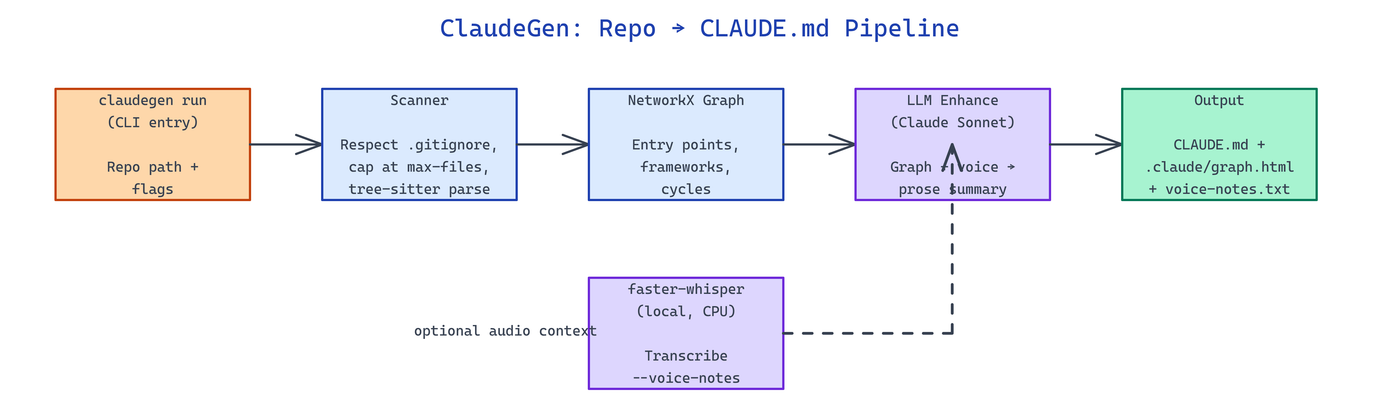 Pipeline Architecture
The Problem
Every new repo you point Claude Code at needs a hand-written CLAUDE.md to get decent answers, and writing one by hand means spelunking through dependency graphs you could have generated in seconds.
NEO built ClaudeGen to scan a repository, extract its real import graph, and emit a ready-to-use CLAUDE.md plus an interactive dependency visualization with one command.
One CLI, Three Commands
ClaudeGen is a Python 3.11+ package that installs a single claudegen entry point. It ships three subcommands covering generation, visualization, and a Gradio web UI:
# Generate CLAUDE.md for a repo
claudegen run /path/to/repo

# Only produce the dependency graph
claudegen graph /path/to/repo

# Launch the Gradio web interface
claudegen ui --host 127.0.0.1 --port 8080
The run command writes CLAUDE.md at the repo root and populates a .claude/ directory with dependency-graph.html (interactive D3.js), dependency-graph.json (raw edges), and optionally voice-notes.txt when you attach audio context.
Tree-Sitter Import Extraction + NetworkX
ClaudeGen doesn't regex-grep for imports — it runs proper AST extraction via tree-sitter parsers for Python, JavaScript, and TypeScript, then loads the edges into a NetworkX graph. That gives you accurate dependency edges even when imports sit inside conditionals, try/except blocks, or dynamic module paths.
From the graph, the tool derives:
| Signal | How it's detected |
|---|---|
| Entry points | Nodes with high out-degree, low in-degree |
| Framework | Import patterns (FastAPI, Django, Next.js, etc.) |
| Cycles | networkx.simple_cycles on the directed graph |
| Critical files | PageRank / betweenness centrality |
| Skipped files | .gitignore rules via gitignore-parser |
Those signals become the sections of the generated CLAUDE.md — architecture summary, framework detection, entry points to start reading, and cycles to watch out for.
Flags, Budgets, and Voice Notes
The run command accepts a tight, practical set of flags:
| Flag | Default | Purpose |
|---|---|---|
--output, -o | <repo>/CLAUDE.md | Output path |
--max-files, -m | 1000 | Hard cap on files scanned |
--voice-notes, -v | None | Path to audio file for context |
--model | anthropic/claude-sonnet-4-6 | LLM for enhancement pass |
--token-budget | 4000 | Max tokens for LLM summary |
--dry-run | False | Preview without writing files |
If you pass --voice-notes meeting.wav, faster-whisper transcribes it locally — no audio leaves your machine — and the transcript is folded into the LLM prompt so the generated doc reflects what the team actually discussed. Without API keys, ClaudeGen still emits a template-mode CLAUDE.md from the graph alone.
git clone https://github.com/dakshjain-1616/Claude_gen_setup
cd Claude_gen_setup
python3 -m venv .venv
source .venv/bin/activate
pip install -e .
claudegen run ~/my-project --voice-notes standup.m4a
How to Build This with NEO
Open NEO in VS Code or Cursor and describe what you want to build. A good starting prompt for this project:
"Build a Python CLI called claudegen that auto-generates CLAUDE.md files for any repository. Use tree-sitter to extract imports from Python, JavaScript, and TypeScript source files, build a NetworkX dependency graph, detect entry points, frameworks, and cycles, and render an interactive D3.js visualization. Add an optional faster-whisper voice-notes transcription step that runs locally. Expose three commands: run, graph, and ui (Gradio). Support flags for --max-files, --voice-notes, --model, --token-budget, and --dry-run. Respect .gitignore."
NEO scaffolds the package, wires tree-sitter grammars, and ships a working CLI. From there you iterate — add Rust and Go parsers, push the CLAUDE.md into a PR as a bot, or emit a per-directory mini-CLAUDE.md instead of one monolith. Each request builds on what's already there.
To run the finished project:
git clone https://github.com/dakshjain-1616/Claude_gen_setup
cd Claude_gen_setup
python3 -m venv .venv && source .venv/bin/activate
pip install -e .
claudegen run /path/to/your/repo
Open CLAUDE.md in the target repo; open .claude/dependency-graph.html in a browser to explore the interactive graph.
NEO turned "write a CLAUDE.md for this repo" from an afternoon of manual spelunking into one command. See what else NEO ships at heyneo.com.
Try NEO in Your IDE
Install the NEO extension to bring AI-powered development directly into your workflow:
- VS Code: NEO in VS Code
- Cursor: Install NEO for Cursor