

Context Aggregator: Ambient Context Collection for LLM Pipelines

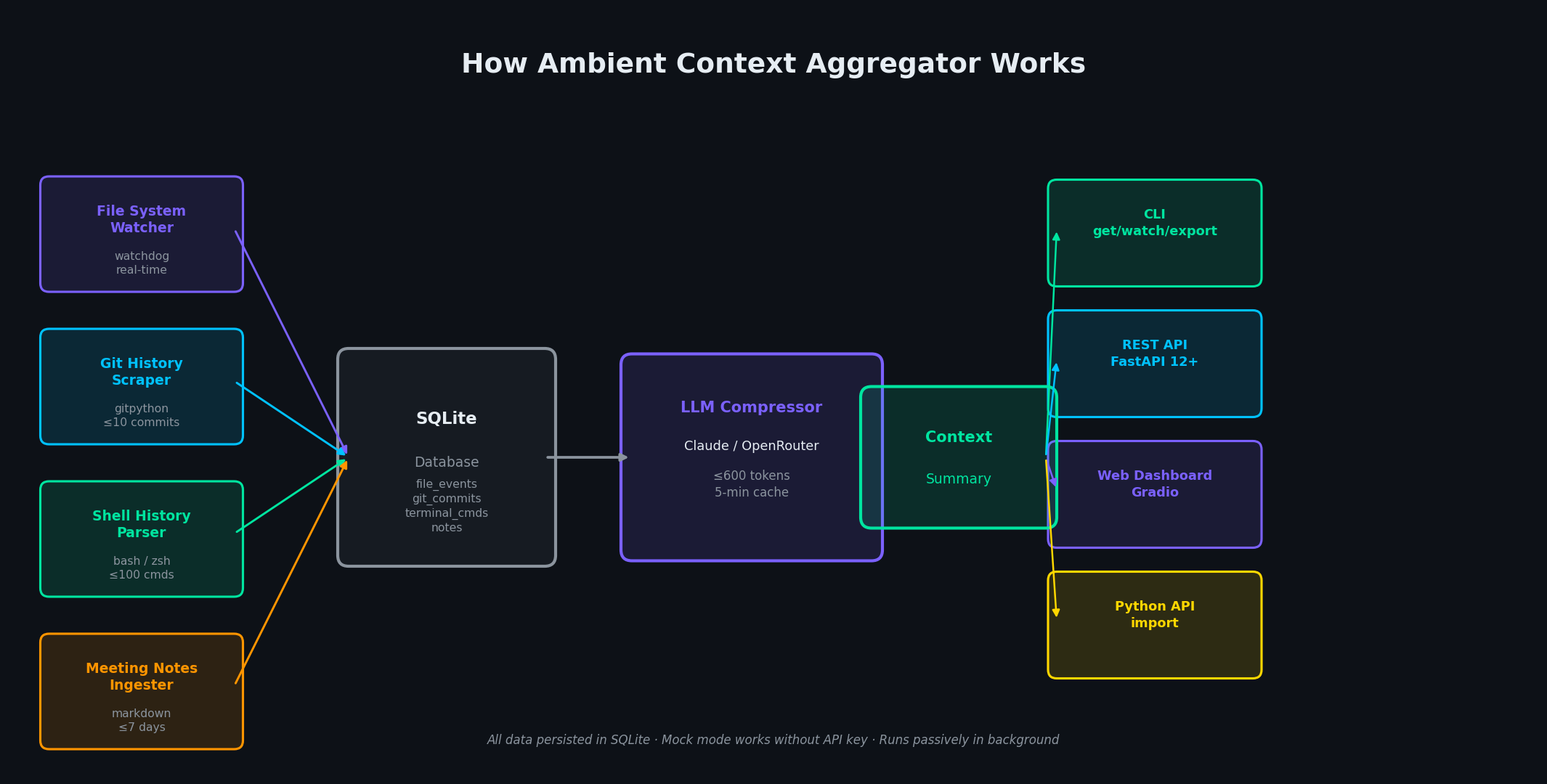 Pipeline Architecture
The Problem
Every time you start a new LLM session you spend the first few messages re-explaining what you were working on. You paste in the relevant file, recap the last git commit, describe the error from your terminal. It is manual, repetitive, and always incomplete.
NEO built Context Aggregator to automatically collect that ambient context from your environment and inject it into LLM pipelines as a structured, queryable object — no copy-pasting required.
Multi-Source Collection Architecture
Context Aggregator runs a lightweight background process that polls configurable sources on independent schedules. Each source is implemented as a collector plugin with a standard collect() -> ContextChunk interface, so new sources can be added without modifying the core aggregator.
The default collector set covers five sources. The file watcher monitors a configurable set of directories and captures recently modified files along with their diffs relative to the last snapshot. The shell history collector reads from .zsh_history or .bash_history and extracts the last N commands with timestamps and exit codes. The clipboard monitor polls the system clipboard at a configurable interval and stores unique entries in a deduplication buffer. The browser tab collector connects to Chrome or Firefox via the debug protocol and captures open tab titles and URLs. The git activity collector runs git log, git diff, and git status in watched repositories and packages the output into structured git context objects.
All collected chunks are tagged with their source, a collection timestamp, and a relevance score computed from recency and change magnitude.
Rolling Context Window and Packaging
Raw chunks are fed into a rolling context window managed by a priority queue. The window has a configurable token budget (default 4096 tokens). When the budget fills, the lowest-scoring chunks are evicted first — preserving the most recent and most-changed content.
The packager serializes the window into a structured context object that LLM pipelines can consume directly:
{
  "collected_at": "2026-04-08T14:32:01Z",
  "token_count": 3841,
  "sources": {
    "git": {
      "repo": "my-project",
      "branch": "feat/new-api",
      "recent_commits": [...],
      "staged_diff": "..."
    },
    "shell": {
      "recent_commands": ["pytest tests/", "pip install httpx", "python main.py"]
    },
    "files": {
      "modified": ["src/api.py", "tests/test_api.py"],
      "snippets": {...}
    },
    "clipboard": {
      "recent_entries": [...]
    }
  }
}
This object can be injected as a system prompt prefix, passed to a tool call, or written to a file that an agent reads at startup.
Source Filters and Pipeline Integration
Source filters let you restrict collection by path pattern, command prefix, or domain. A filter config entry looks like:
sources:
  files:
    watch_dirs: ["~/projects/my-app/src"]
    extensions: [".py", ".ts", ".yaml"]
    exclude: ["__pycache__", "node_modules"]
  shell:
    max_commands: 30
    exclude_prefixes: ["ls", "cd", "pwd"]
  browser:
    enabled: false
The aggregator exposes a local HTTP endpoint (GET /context) that returns the current packaged context object. Agents and pipelines call this endpoint instead of constructing context manually. A Python SDK helper wraps the call:
from context_aggregator import get_context

ctx = get_context()  # fetches from local daemon
response = llm.chat(system=ctx.as_system_prompt(), user=user_message)
How to Build This with NEO
Open NEO in VS Code or Cursor and describe what you want to build. A good starting prompt for this project:
"Build a Python background daemon that collects ambient context from multiple sources — file system changes, shell history, clipboard, browser tabs via debug protocol, and git activity — and packages the collected chunks into a structured JSON context object. Manage a rolling token-budget window with priority eviction. Expose the current context via a local HTTP endpoint. Support YAML config for source filters and collection schedules."
NEO generates the project structure and core implementation. From there you iterate — ask it to add a new collector for Slack messages, build a relevance scorer that weights chunks by semantic similarity to the current task, or extend the SDK with a LangChain context loader. Each request builds on what's already there without re-explaining the context.
To run the finished project:
git clone https://github.com/dakshjain-1616/ambient-context-aggregator
cd ambient-context-aggregator
pip install -r requirements.txt
python daemon.py --config config.yaml
With the daemon running, call GET http://localhost:8765/context from any agent or pipeline to receive a fully packaged, token-budgeted context object reflecting your current environment.
NEO built an ambient context daemon that continuously harvests environment signals from shell, git, files, and clipboard and serves them as structured LLM-ready context objects over a local HTTP endpoint. See what else NEO ships at heyneo.com.
Try NEO in Your IDE
Install the NEO extension to bring AI-powered development directly into your workflow:
- VS Code: NEO in VS Code
- Cursor: Install NEO for Cursor